Best Smart Thermostat Buying Guide — Black Friday Deals 2026
A smart thermostat is only a useful Black Friday find if it suits your heating and cooling system, wiring, and preferred way of controlling the home. The three options here take different routes: Amazon centers control on Alexa, Google Nest pairs app scheduling with remote access, and ecobee emphasizes compatibility across several smart-home ecosystems. Before comparing an offer, identify your HVAC setup and the assistants your household uses. Then check that the listing is for the exact model and variant you intend to buy. Black Friday can make comparison tempting, but no sale label answers those fit questions for you.
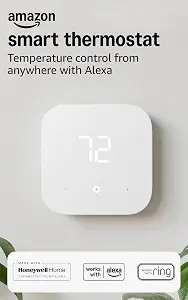
The Amazon Smart Thermostat is the Best Budget pick in this guide as an editorial choice, not a claim that it has the lowest Black Friday price. Its appeal is a fairly direct Alexa-centered setup: it works with Alexa and Ring, and Alexa can automatically switch among preferred home, away, and sleep temperatures. That arrangement may suit a household already using Alexa and wanting those temperature preferences handled as part of its routine. If you mainly want an app-based way to make changes, the thermostat can also be set remotely from anywhere with the Alexa app.
The key compatibility checkpoint is wiring: this model requires a C-wire. Check the wiring at your existing thermostat and confirm your system’s requirements before adding it to a Black Friday shortlist. The available product details also describe comfort-zone adjustments using select Echo devices or an Amazon Smart Air Quality Monitor, based on temperature readings or presence detection. Those are specific ways to add context to heating and cooling adjustments; consider whether you already use, or want to use, those named devices rather than assuming they are included with the thermostat.
Installation is another practical point to weigh. The Alexa app guides you through the installation process, and the thermostat is made with Honeywell Home Thermostat Technology. Those details may be useful if you want app guidance and an Alexa-linked control experience, but they do not replace checking that your wiring and HVAC setup are compatible. For Black Friday, verify the exact Amazon Smart Thermostat listing and the included product variant before comparing offers. This pick makes the most sense when the required C-wire is present and Alexa and Ring fit your household; if either condition is uncertain, resolve it before treating the offer as a bargain.
Key specs
Compatibility
Works with Alexa and Ring
Wiring
C-wire required
Temperature control
Alexa can automatically switch between your preferred home, away, and sleep temperatures.
Remote control
set it yourself from anywhere with the Alexa app.
Installation
The Alexa app will guide you through the installation process
Technology
Made with Honeywell Home Thermostat Technology
Comfort zones
using select Echo devices or Amazon Smart Air Quality Monitor to automatically adjust heating and cooling based on temperature readings or presence detection.
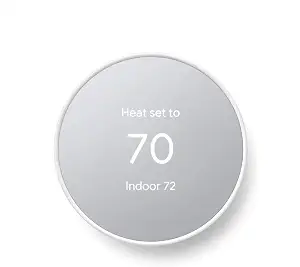
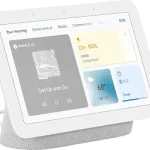
The Google Nest Thermostat – Snow carries the Best Overall label among these three editorial picks. That label is a guide to the options here, not the result of comparative testing or a claim about the whole market. Its listed strengths are a programmable schedule in the Google Home app on Android or iPhone, plus remote temperature changes for family members using a phone, laptop, or tablet. For a household that wants to set an energy-efficient schedule in an app and retain remote control, those are useful details to put near the top of a Black Friday comparison.
Check the C-wire qualification carefully rather than treating this thermostat as universally wire-free. It is designed to work without a C-wire in most homes, but some systems—including heating only, cooling only, zone controlled, and heat pump systems—need a C-wire or another compatible power accessory. If you do not know which system you have, establish that before settling on a listing. This can matter more to a purchase decision than a seasonal offer, because the relevant question is whether the thermostat and any needed power arrangement suit your home.
The thermostat connects through Wi-Fi and is compatible with Google Assistant and all Matter-certified voice assistants. Voice control requires a compatible smart device, so check what you already use and what the listing says about the exact variant. Its app schedule and remote access can also be considered separately from voice control: a household may value one, both, or neither. During Black Friday, compare the offer for this Snow model against the needs you have identified, including wiring and assistant setup. The Best Overall label is an editorial starting point, not a reason to skip those checks.
Key specs
Scheduling
easily program an energy efficient schedule in the Google home app on your Android or iPhone
Remote control
Remote control lets family members change the thermostat temperature from anywhere on a phone, laptop, or tablet[1]
C-wire compatibility
The Nest Thermostat is designed to work without a C wire in most homes, but for some systems, including heating only, cooling only, zone controlled, and heat pump systems, you’ll need a C wire or other compatible power accessory.
Voice assistant compatibility
Compatible with Google Assistant and all Matter-certified voice assistants.
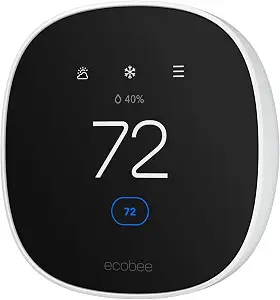
The ecobee Smart Thermostat Essential is the Best for Multi-Ecosystem Households choice because its listed compatibility includes Apple HomeKit, Google Assistant, and Alexa. That distinction may be helpful when people in one home rely on different smart-home platforms. The thermostat uses Wi-Fi and has an LCD screen with a listed size of 3.74 inches. Consider whether these details fit your control preferences, then check the Black Friday listing to ensure it names the Essential model rather than a different ecobee product.
Its stated HVAC compatibility covers most 24 VAC equipment, including gas, oil, electric, dual fuel, forced air Conventional (2H/1C or 1H/2C), Heat Pump (2H/1C), and boilers. The wording is qualified as “most,” so compare your equipment’s configuration with the listing rather than assuming every system is covered. For homes without a C-wire, the product details point to the ecobee Power Extender Kit (PEK) as an option. Check whether that is the right arrangement for your installation and whether the listing addresses the components you need.
The built-in eco+ features include indoor humidity detection, a schedule assistant, and time of use, which preheats or precools the home when energy is less expensive to reduce energy use during peak hours. An optional SmartSensor can measure temperature and movement in the room where it is placed; the SmartSensor two-pack is sold separately. This may be relevant if room-specific readings matter to your plans, but include the separate accessory in your comparison rather than treating it as part of the thermostat offer. For Black Friday, weigh those options against the exact listing and your household’s ecosystem, wiring, and HVAC needs.
Key specs
Connectivity
Connectivity Technology Wi-Fi
Display
LCD Screen Size 3.74 inches
Smart home compatibility
Works with leading smart home ecosystems. Pair Smart Thermostat Essential with Apple HomeKit, Google Assistant, and Alexa
HVAC compatibility
Works with most 24 VAC HVAC equipment: Gas, oil, electric, dual fuel, forced air Conventional (2H/1C or 1H/2C) Heat Pump (2H/1C) Boilers.
C-wire option
No C Wire, no problem. Get the ecobee Power Extender Kit (PEK) for homes without a C-Wire
Additional features
Built in eco+ Smart Features: Indoor humidity detection, schedule assistant, time of use which preheats or precools your home when energy is less expensive to reduce energy use during peak hours
Optional sensor
Add in a SmartSensor which allows you to measure the temperature in rooms that matter most. It reads temperature and movement in whatever room it is placed in for complete home monitoring and energy savings (SmartSensor 2 pack sold separately)
Make HVAC and wiring the first filter
Before opening a Black Friday deal page, identify the type of heating and cooling equipment in your home and the wiring available at the thermostat. These are practical screening questions, not details to leave until after choosing a favorite. The Amazon Smart Thermostat requires a C-wire. The Google Nest Thermostat is designed to work without one in most homes, but specified system types may need a C-wire or compatible power accessory. The ecobee Smart Thermostat Essential works with most listed 24 VAC equipment, and its product details point to a Power Extender Kit for homes without a C-wire.
Treat every qualification as meaningful. “Most homes” and “most 24 VAC equipment” do not promise that every installation will fit. For Nest, note the stated exceptions: heating-only, cooling-only, zone-controlled, and heat-pump systems may need a C-wire or other compatible power accessory. For ecobee, compare your actual equipment with its stated categories and configurations. If you are unsure what is behind the wall or what type of system you have, resolve that uncertainty before buying rather than relying on a broad category name.
Make a short record of your system and wiring, then compare it with the exact model’s listing. During Black Friday, an attractive offer should not push this check aside. Confirm which thermostat is being offered and whether the wiring arrangement described for that model matches your home. This simple order—system first, offer second—helps narrow the choices for a reason tied to fit, not seasonal urgency.
Pick the control path your household will use
A thermostat can offer useful app or voice options, but the best match depends on the habits and devices already present in your household. The Amazon model works with Alexa and Ring and offers remote control through the Alexa app. Nest supports scheduling through the Google Home app, remote temperature changes through a phone, laptop, or tablet, and compatibility with Google Assistant and Matter-certified voice assistants. Ecobee Essential lists compatibility with Apple HomeKit, Google Assistant, and Alexa. These are different control paths; choose based on the services you intend to use.
Separate app access from voice control when comparing. Nest’s product details specify that voice control requires a compatible smart device. If voice commands matter, check that you have a compatible device and that the intended assistant is one you use. If your priority is changing settings away from home, compare the stated remote-control options instead. Avoid assuming that an ecosystem connection automatically means every control method works without the required app or compatible device.
This distinction is particularly useful when Black Friday listings emphasize smart-home compatibility in a short description. Write down the assistant or app that matters most, then verify that the exact model supports it. If several people will control the thermostat, consider which app or platform they are comfortable using. A broader set of ecosystem options may matter to a mixed-platform home, while an Alexa-centered setup may be a straightforward fit for an Alexa household. The goal is not to collect the longest feature list, but to choose controls your household can actually use.
Decide how much automation is useful
Think about the temperature changes you want the thermostat to handle without repeated manual adjustments. The Amazon Smart Thermostat can have Alexa automatically switch among preferred home, away, and sleep temperatures. That is a clear match for someone who wants those three kinds of settings reflected in an automatic routine. The Nest listing describes programming an energy-efficient schedule in the Google Home app. Ecobee Essential includes a schedule assistant as part of its eco+ features. These approaches are related to routine-setting, but the supplied details describe them differently, so compare the specific function rather than assuming they behave identically.
Consider a normal week in your household. Do preferred settings change between time at home and time away? Is a schedule in an app enough, or do you want the listed home, away, and sleep temperature changes? If your routine varies, think about whether you would be comfortable adjusting settings remotely through the relevant app. These questions help clarify which feature is useful to you without promising a particular energy result or assuming that a schedule will suit every household.
Black Friday is a good moment to compare these feature differences, not a reason to buy automation you will not use. Read the exact offer and variant details for the scheduling or automatic adjustment feature you care about. In particular, distinguish an app-programmed schedule from the Amazon model’s described automatic switching among preferred temperatures. A clear picture of your routine makes the decision more practical: prioritize the function that addresses a real household habit, and treat other options as secondary.
Weigh room readings and comfort options
Room-specific sensing may matter if you want information beyond a single thermostat location. The ecobee Essential can pair with an optional SmartSensor that reads temperature and movement in the room where it is placed; the SmartSensor two-pack is sold separately. The Amazon model’s listed comfort-zone adjustment can use select Echo devices or an Amazon Smart Air Quality Monitor, adjusting heating and cooling based on temperature readings or presence detection. These are distinct arrangements with named devices, so consider which one fits your existing setup and what you would need to add.
Ecobee’s built-in eco+ details include indoor humidity detection and a time-of-use feature that preheats or precools the home when energy is less expensive, with the stated aim of reducing energy use during peak hours. If those functions are relevant, check the product listing for the exact model and note the difference between built-in features and separately sold accessories. Do not count an optional sensor as included unless the particular listing clearly identifies it in the offer.
For a Black Friday comparison, write down any add-on you are considering alongside the thermostat. Then verify whether it is included, optional, or sold separately in the exact variant you are viewing. The aim is to compare the setup you actually intend to purchase, not just the main product name. If you do not need room readings or additional sensing, you may prefer to keep the choice focused on wiring, app control, and scheduling rather than treating more features as automatically better.
Use a Black Friday checklist before choosing
Treat the seasonal offer as one line in a decision worksheet. First confirm the exact model and variant; then check HVAC compatibility, C-wire needs, preferred app or assistant, and the features you plan to use. For the Amazon thermostat, note the C-wire requirement and Alexa/Ring connection. For Nest, preserve the stated C-wire exceptions and the compatible-device requirement for voice control. For ecobee, check its qualified HVAC compatibility, the PEK option, and whether any SmartSensor is separate. These checks make comparisons more grounded than a sale label alone.
Next, compare like with like. Make sure each listing refers to the intended thermostat, and examine what the offer actually includes before comparing it with another listing. Do not assume that a Black Friday tag guarantees a particular discount, that a similarly named product is the same variant, or that an optional accessory comes in the box. The supplied product details do not establish a current promotion, so make your decision from the offer shown to you and the requirements of your home.
Finally, apply your own priorities rather than letting an editorial label decide for you. Best Overall, Best Budget, and Best for Multi-Ecosystem Households are labels for these selections, not measured claims or guarantees about every shopper’s needs. If wiring fit is unresolved, pause. If the ecosystem matches but the key feature does not, reconsider. A thoughtful Black Friday purchase is the exact product, configured for the needs you have confirmed, at an offer you have independently checked.
Make your Black Friday choice
A smart thermostat shortlist becomes much easier to judge once the system, wiring, and preferred control method are clear. The Amazon model centers on Alexa and requires a C-wire; Nest combines Google Home scheduling and remote access with specific C-wire qualifications; ecobee Essential brings several ecosystem options and listed sensing features, with its SmartSensor sold separately. Use those differences to narrow your choice, then verify the exact listing and offer. Black Friday can be a useful time to compare, but the right purchase is the one whose stated requirements and features fit your home.