Google Nest Learning Thermostat – 3rd Gen – Programmable Smart Thermostat for Home – Compatible with Alexa (Stainless Steel) (ASIN B0DZDB98JG)
Best Nest Thermostat Buying Guide — Black Friday Deals 2026
Choosing a Nest thermostat is less about finding a single winner than deciding how much scheduling help, room-specific control, and smart-home integration you want. The listed options range from app-programmed scheduling to a model that learns your preferences, plus a learning model bundled with a temperature sensor. Black Friday can make this a useful time to compare those configurations, but the offer matters only if it matches your system and the features you intend to use. Check the exact model, color, and included accessories before comparing offers. The recommendations below reflect distinct shopping priorities, not measured performance or a promise that any item is discounted.
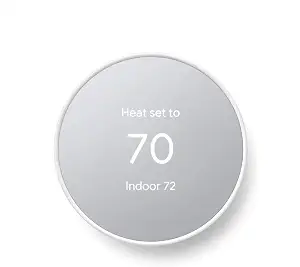
Best Budget: This option is a straightforward choice for someone who wants to create a schedule in an app and adjust the temperature remotely. You can program an energy-efficient schedule in the Google Home app on an Android or iPhone. Family members can also change the temperature from anywhere using a phone, laptop, or tablet. Those functions suit a household that prefers to set its own routine and make occasional adjustments, rather than choosing a package centered on a learning thermostat or an included room sensor.
The thermostat connects over Wi-Fi and is compatible with Google Assistant and all Matter-certified voice assistants. Voice control requires a compatible smart device, so consider whether you already have a suitable device or plan to use app controls instead. Its C-wire guidance deserves attention before checkout: it is designed to work without a C wire in most homes, but some systems—including heating only, cooling only, zone controlled, and heat pump systems—need a C wire or another compatible power accessory. That is a practical compatibility check, not a reason to assume every home needs extra equipment.
The Best Budget label distinguishes this model as the app-scheduling pick among these three, not as a claim about its current price or a measured value ranking. Black Friday listings may show different colors, bundles, or model variants, so verify that the offer is for the Snow version described here and check what is actually included. If your priority is a schedule you set yourself, remote changes, and compatible voice control, this feature set may be enough. If you want the thermostat to learn your preferences or want a room sensor included, weigh those needs against this simpler app-programmed approach before deciding.
Key specs
Scheduling
easily program an energy efficient schedule in the Google home app on your Android or iPhone
Remote control
Remote control lets family members change the thermostat temperature from anywhere on a phone, laptop, or tablet[1]
C-wire compatibility
The Nest Thermostat is designed to work without a C wire in most homes, but for some systems, including heating only, cooling only, zone controlled, and heat pump systems, you’ll need a C wire or other compatible power accessory.
Voice assistant compatibility
Compatible with Google Assistant and all Matter-certified voice assistants.
Voice control requirement
Voice control requires a compatible smart device.
Connectivity
Wi-Fi
Google Nest Learning Thermostat (4th gen) + Nest Temperature Sensor (2nd gen) – Obsidian
Google Nest Learning Thermostat (4th gen) + Nest Temperature Sensor (2nd gen) – Obsidian (ASIN B0D5BBYRJM)
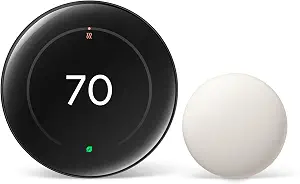
Best Overall: This bundle suits shoppers who want a learning thermostat and a way to account for temperatures in another room. It includes the Nest Temperature Sensor (2nd gen), which you can place in a room and schedule through the Google Home app to reach a chosen temperature at a particular time of day. That can be useful when the room where the thermostat is located does not represent the space you want to prioritize at a given time. The sensor is a meaningful part of this package, so compare it as a complete bundle during Black Friday rather than treating the thermostat and sensor as interchangeable listings.
The thermostat works with most 24V systems, including gas, electric, oil, forced air, heat pump, and radiant systems. No C wire is required in most homes, though the qualification matters: confirm system compatibility before buying rather than assuming your setup is covered. The listing describes it as easy to install yourself, and it is Matter compatible for smart-home integration. You can adjust it remotely by phone or use voice with Alexa, Siri, or a Google Assistant smart speaker. These controls make it a flexible fit for households that want more than one way to manage temperatures.
Its away-temperature feature uses the temperature outside to help find an energy-saving temperature while you are away, then returns to a comfortable temperature within an hour of your return. That may appeal to someone who does not want to manage every adjustment manually. The included sensor and room scheduling are also the reason for the Best Overall label here: they bring together remote adjustment, learning, and a specific room-focused option in one listed package. During Black Friday, compare the exact bundle and confirm that the sensor is included in the offer you are viewing. Choose this option if that combination is useful; if you mainly want app scheduling without the bundled sensor, consider whether another configuration better fits your routine.
Key specs
System compatibility
works with most 24V systems, including gas, electric, oil, forced air, heat pump, and radiant, and no C wire is required for installation in most homes
App and voice control
Adjust on your phone from anywhere[1] or by using your voice with Alexa, Siri, or Google Assistant smart speaker[3]
Smart home support
it’s easy to install yourself and it’s Matter compatible for simple integration into your smart home[5]
Included sensor
it comes with the Nest Temperature Sensor (2nd gen)
Room temperature scheduling
put a sensor in any room and use the Google Home app to set the temp it should reach at a certain time of day
Away temperature adjustment
It uses the temperature outside to help find an energy-saving temperature when you’re away and returns to a comfortable temperature within an hour of your return[1]
Google Nest Learning Thermostat – 3rd Gen – Programmable Smart Thermostat for Home – Compatible with Alexa (Stainless Steel)
Google Nest Learning Thermostat – 3rd Gen – Programmable Smart Thermostat for Home – Compatible with Alexa (Stainless Steel) (ASIN B0DZDB98JG)
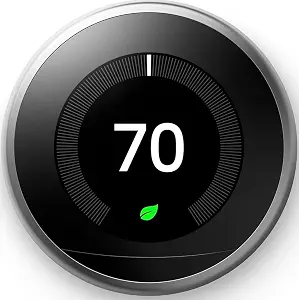
Best for Learning a Schedule: Consider this model if you would rather have a thermostat learn the temperatures you like and your schedule, then program itself. That approach contrasts with entering a schedule yourself in an app. Its Home/Away Assist automatically adjusts to an Eco Temperature after you leave, while remote control lets you change the temperature from a phone, laptop, or tablet. Together, these functions may suit someone who wants automatic adjustments for a regular routine but still wants the option to make a change from elsewhere.
Energy History lets you check your phone to see how much energy you used and why. The thermostat also looks out for heating and cooling systems and sends an alert if something does not seem right. These are useful considerations for a shopper who values information about energy use and alerts about system concerns, rather than choosing solely on scheduling style. The product works with the Nest Temperature Sensor, which is sold separately; factor that separate purchase into your decision if room sensing is important to you.
The Best for Learning a Schedule label points to its schedule-learning feature, not a guarantee that it will suit every household better than the other choices. The product name identifies the 3rd Gen model in Stainless Steel, so check the exact model and finish in any Black Friday offer. The listed title also identifies Alexa compatibility, while the supplied feature details describe remote control and other capabilities. Compare the listing you are considering carefully, especially if you are choosing between this model and the bundle that includes a 2nd gen sensor. This is the distinct pick for shoppers drawn to self-programming, Eco Temperature adjustments after leaving, and Energy History.
Key specs
Scheduling
learns your schedule and the temperatures you like and programs itself
Home/Away Assist
automatically adjusts itself to an Eco Temperature after you leave
Remote control
remote control lets you change the temperature from anywhere on your phone, laptop, or tablet[1]
Energy history
With Energy History, just check your phone to see how much energy you used and why
HVAC monitoring
looks out for your heating and cooling systems; sends an alert if something doesn’t seem right
Temperature sensor compatibility
works with the Nest Temperature Sensor (sold separately)
Start with the way you want schedules handled
Think about whether you enjoy setting a routine or would rather let the thermostat learn one. The Snow model lets you program an energy-efficient schedule in the Google Home app. That is a clear fit if you want to decide the schedule yourself and use the app to make changes. By contrast, the 3rd Gen Learning Thermostat learns the schedule and temperatures you like, then programs itself. The 4th gen bundle also offers learning, alongside its included sensor and room scheduling. These are different ways to approach everyday temperature control, not interchangeable descriptions of the same feature.
Consider your habits rather than assuming automation is always preferable. If your routine changes often and you like direct control, app scheduling may feel more understandable. If you prefer the thermostat to learn your preferences, look closely at the learning models and the specific features described for each. Black Friday comparisons should preserve this distinction: a lower displayed offer for a different model does not make it an equivalent choice. Check the full model name and included items, then ask whether its scheduling approach matches how you expect to manage your home.
Use Black Friday listings to compare like with like
A Black Friday offer is useful to assess only after you confirm what product it covers. These listings include a Snow thermostat, a 4th gen learning bundle with a 2nd gen temperature sensor, and a 3rd Gen Learning Thermostat in Stainless Steel. Read the complete product name and variant carefully; do not assume that a similar-looking listing includes the same sensor or refers to the same generation. The supplied details do not establish a live promotion, so treat any offer you encounter as something to verify on its own terms.
Compare the package contents and features you actually intend to use, not just the headline. If a room sensor matters, the bundled model has one included; the 3rd Gen listing says its compatible sensor is sold separately. If you want an app-programmed schedule, check that the offer is for the Snow model described here. If learning is your priority, distinguish the 3rd Gen product from the 4th gen bundle. Black Friday shopping can be hurried, so take a moment to confirm the exact variant before deciding that two offers are comparable.
Check wiring and system fit before checkout
Thermostat compatibility is a practical first filter. The 4th gen bundle is described as working with most 24V systems, including gas, electric, oil, forced air, heat pump, and radiant, with no C wire required for installation in most homes. The Snow model is also designed to work without a C wire in most homes, but its listed exceptions include heating-only, cooling-only, zone-controlled, and heat-pump systems, which need a C wire or another compatible power accessory. Keep each model’s own qualification attached to it rather than applying one model’s guidance to another.
Before choosing, identify your heating and cooling setup and check whether the C-wire conditions in the exact product listing apply. The details here do not establish compatibility with every home or every system configuration. If you cannot confirm the relevant wiring or system type, resolve that uncertainty before making a Black Friday purchase. A tempting offer is not useful if you have not established that the thermostat suits your setup. This check is especially important when comparing products whose C-wire statements are phrased differently, even though both describe no-C-wire installation as possible in most homes.
Decide whether room-specific temperature control matters
The 4th gen bundle is the only listed package that includes a Nest Temperature Sensor (2nd gen). Its room scheduling lets you put a sensor in a room and use the Google Home app to set the temperature that room should reach at a certain time of day. This may matter when you want to make a particular room the focus of a scheduled temperature target. Think through where you would place the sensor and when you would use that schedule before treating the accessory as a reason to choose the bundle.
The 3rd Gen Learning Thermostat works with the Nest Temperature Sensor, but the sensor is sold separately. The Snow model’s supplied details describe app scheduling and remote control, not an included sensor. That difference is a useful way to compare package contents without assuming that an unmentioned feature is unavailable. If room scheduling is central to your plan, account for whether the sensor is included in the exact Black Friday listing. If you do not expect to use room-specific scheduling, compare the other features and choose based on your preferred approach to schedules, remote adjustments, and smart-home control.
Choose controls and information you will actually use
All three choices offer some form of remote adjustment, but the supplied details describe their controls differently. The Snow thermostat lets family members change the temperature from a phone, laptop, or tablet and supports Google Assistant and Matter-certified voice assistants, with a compatible smart device required for voice control. The 4th gen bundle lists phone adjustment and voice control using Alexa, Siri, or Google Assistant smart speakers, as well as Matter compatibility. The 3rd Gen model offers remote control and Energy History, which shows energy use and why through a phone.
Match those details to the devices and information you already want to use, without assuming compatibility beyond what is stated. Someone who wants voice options can compare the explicit assistant details for the first two models. Someone who values an energy-use view or alerts when something does not seem right with heating or cooling systems can consider the 3rd Gen feature set. Black Friday should not turn a secondary feature into a must-have: choose controls and information that fit your routine, and verify the exact model before acting on an offer.
Make your Black Friday choice
The right Nest thermostat depends on the tradeoff you prefer: setting a schedule yourself, letting a thermostat learn one, or choosing a learning bundle with a room sensor included. Check system and C-wire guidance for the specific model, then compare remote and voice controls, sensor needs, and the information you want from the app. During Black Friday, confirm the exact generation, finish, and package contents before judging an offer. These recommendations identify different reasons to choose each listed option; they do not promise a discount or replace checking whether a model suits your home. A careful match is more useful than choosing by sale language alone.