Best Chromebook Buying Guide — Black Friday Deals 2026
A Chromebook can serve as a homework station, a video-call screen, or a portable place to handle everyday browser-based tasks. This Black Friday, begin with how you expect to use yours, then check the exact model and configuration in the offer: screen details, memory, storage, ports, and camera features differ across these picks. The Lenovo pairs a touchscreen with a stated battery-life figure, the HP brings a 15.6-inch format and a privacy-shutter webcam, and the Acer combines a WUXGA touch display with a detailed camera specification. None is automatically the right fit for every routine. Compare what the listing identifies with what matters in your space, and treat a sale label as a prompt to inspect the details—not as proof that a configuration suits you.
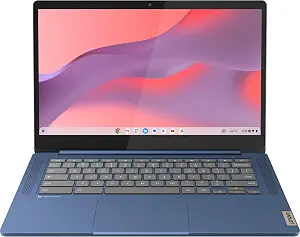
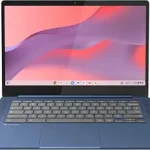
Best Budget is the editorial label for the Lenovo Flagship Chromebook, whose listed configuration includes a 14-inch Full HD touchscreen, a MediaTek Kompanio 520 octa-core processor, 4GB of RAM, and 64GB of eMMC storage. It runs Google Chrome OS. If your everyday routine centers on a touch-enabled screen and straightforward Chromebook use, those facts provide a clear place to start. Consider where the laptop will sit and whether you prefer interacting directly with the display; the touchscreen is the defining user-facing feature in this configuration. The processor’s supplied core and clock details are available in the listing if you want to check them alongside the tasks you expect to do.
The listed wireless combination is Wi-Fi 6, 11ax 2×2, and Bluetooth 5.1. The product also states 13.5 hours of battery life. Treat that figure as the stated specification, not a guarantee of the time you will get in your own routine. Usage and conditions can affect real-world battery life, and the supplied details do not specify a particular usage scenario for that figure. If you often move between places, it is a relevant claim to compare with the other details that matter to you; if the Chromebook mostly stays in one spot, display interaction or storage may be more important in your decision.
At Black Friday, verify that the offer is for this exact Lenovo configuration before comparing its price with another Chromebook. Pay particular attention to the stated 4GB RAM and 64GB eMMC storage, rather than assuming a listing with a similar name has the same setup. Think through what you plan to keep locally and which everyday activities you expect to use before deciding whether the listed capacity fits. Best Budget is a recommendation within this small selection, not a claim about every Chromebook or a judgment based on measured performance. Choose it when its touchscreen, operating system, wireless details, and stated battery life line up with your priorities—and when the exact offer you are viewing matches those specifications.
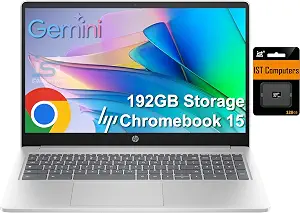
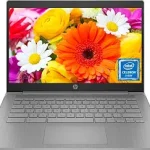
Best Overall is the editorial pick for shoppers who want a broad set of practical details to weigh in one Chromebook listing. The HP Chromebook 15 has a 15.6-inch format named in its product title, an Intel N200 four-core processor, and 8GB of DDR5 RAM. That mix gives you concrete configuration information to compare against your routine, whether you picture a laptop set up on a desk for browser work or one used for video calls and general day-to-day tasks. The listed facts do not establish how it performs in every app, so use the stated hardware as a guide to fit rather than a promise about a particular workload.
For calls, the HD webcam includes a privacy shutter, a useful detail for someone who wants a physical way to cover the camera when it is not in use. The laptop also lists two SuperSpeed USB Type-C ports, each described as supporting USB Power Delivery and DisplayPort 1.4. Those connection details may matter when you are planning which compatible accessories or displays to use; check the exact accessory requirements rather than assuming a cable or device will work. Its ChromeOS Auto Update Expiration date is June 2030, a specific support detail worth considering if you are comparing listings for how long updates are scheduled.
The product title states 192GB of storage, while the supplied configuration details identify 8GB of DDR5 RAM. Look at the listing’s exact variant and storage description before checkout, especially if another offer uses a similar product name. During Black Friday, a headline discount alone does not tell you whether the selected version is the one you intended. Confirm the model, the stated memory and storage, and the webcam and port details on the actual offer page. Best Overall here is a category-level editorial choice among these three options, not a claim that this Chromebook has been tested or is best for every shopper. It is a sensible starting point if those particular details match your priorities.
Key specs
Processor
Intel N200 Processor with 4-cores
Memory
8GB of DDR5 RAM
Webcam
HD webcam with privacy shutter
USB-C ports
2 x SuperSpeed USB Type-C 5Gbps (USB Power Delivery, DisplayPort 1.4)
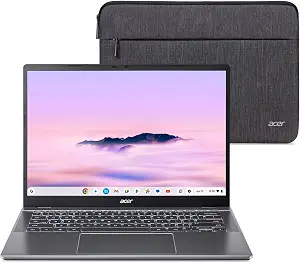
Best for video-call camera detail is the editorial label for the Acer Chromebook Plus 514. Its listed camera is an FHD Facial Auto Exposure Camera with 1920 x 1080 resolution and 1080p video at 60 FPS. That is a particularly specific camera description among these picks, making it useful for shoppers who want to compare camera details before choosing a Chromebook for calls. The listing does not establish how the image will look in every room or app, so consider the specification alongside your usual lighting and call setup rather than treating it as a guarantee of a particular result.
The screen is described as a 14-inch WUXGA 16:10 touch display with 300-nits brightness and an anti-glare coating. For a desk near a window or a shared workspace, those named display characteristics give you factors to consider: screen format, touch interaction, brightness, and coating. They do not by themselves determine whether the screen suits your surroundings, so think about where you will use it and whether touch input is part of your routine. The machine also lists an Intel Core i3-1315U processor, 8GB of LPDDR5 on-board memory, and a 256GB PCIe Gen4 SSD. Check those exact components against the kinds of browser tasks and locally stored files you expect to handle.
The Acer lists Intel Wi-Fi 7 support for dual-stream Wi-Fi in the 2.4GHz, 5GHz, and 6GHz bands. It also has two USB Type-C ports described as USB 3.2 Gen 2, up to 10 Gbps, with DisplayPort over USB Type-C and USB charging up to 65W. These are detailed connection specifications to check against your network and accessories; they do not guarantee compatibility with every router, display, charger, or cable. Chrome OS is the stated operating system. For Black Friday, inspect the selected Acer variant and make sure the camera and display description belongs to the offer you are considering. The Best for video-call camera detail label reflects the specificity of the listed camera feature, not a comparative test result.
Key specs
Display
14” WUXGA 16:10 300-nits touch display with anti-glare coating
Processor
Intel Core i3-1315U Processor – up to 4.5GHz, 6 cores, 8 threads, 10MB Intel Smart Cache
Memory
8GB LPDDR5 On-Board Memory
Storage
256GB PCIe Gen4 SSD
Wireless
Intel Wi-Fi 7 supports dual-stream Wi-Fi in the 2.4GHz, 5GHz and 6GHz bands
Camera
FHD Facial Auto Exposure Camera (1920 x 1080) with 1080p Video at 60 FPS
USB-C ports
2 – USB Type-C Ports USB 3.2 Gen 2 (up to 10 Gbps) DisplayPort over USB Type-C & USB Charging (Up to 65W)
Operating system
Chrome OS
Picture the place where your Chromebook will live
A good shortlist starts with the room and routine, not a sale banner. If you expect to work mostly at a desk, consider whether a 15.6-inch format, like the size stated in the HP product title, suits the space you have available. If you prefer a smaller named display format, both the Lenovo and Acer list 14-inch screens, though their display descriptions differ: Lenovo specifies Full HD touch, while Acer specifies WUXGA 16:10 touch, 300-nits brightness, and an anti-glare coating. These details can help you identify what to investigate, but they cannot tell you how a display will feel in your particular room.
Think about how you interact with a laptop. A touchscreen is specified for the Lenovo and Acer, so those may merit a closer look if direct screen interaction is part of your plan. Do not assume a model has or lacks a feature simply because the supplied details do not mention it; verify anything important on the exact product page. During Black Friday, check the product name and selected configuration, then confirm that the display details you care about correspond to that variant. A short pause to check fit can be more useful than choosing by screen size alone.
Read the configuration as a whole
Memory, storage, and processor are most useful when considered together with your intended routine. The Lenovo lists 4GB RAM and 64GB eMMC storage alongside its MediaTek Kompanio 520 processor. The HP lists 8GB DDR5 RAM and an Intel N200 four-core processor, while its product title states 192GB of storage. The Acer lists 8GB LPDDR5 on-board memory, a 256GB PCIe Gen4 SSD, and an Intel Core i3-1315U processor. These are configuration facts, not a promise that one model will feel faster for every activity.
Make a practical list of what you plan to do: browser-based work, calls, or keeping files on the device, for example. Then check whether the listed memory and storage are aligned with that plan. Do not infer that a device cannot handle a task from a specification alone, and do not assume additional capabilities that are not stated. For a Black Friday comparison, confirm that the listing’s selected variant matches the product details you are using to decide. Similar names or product-page options can make it easy to compare the wrong configurations if you skip that check.
Choose call features for your own setup
Camera detail can matter if video calls are a regular part of your day. The HP lists an HD webcam with a privacy shutter. The Acer identifies an FHD Facial Auto Exposure Camera at 1920 x 1080, with 1080p video at 60 FPS. That specification makes the Acer the camera-detail recommendation in this selection, but it does not establish how either webcam will look under every lighting condition or with every calling service. Think about whether camera resolution, the listed shutter, or both are the details you want to prioritize.
Also consider the environment where you will take calls. Room lighting, camera placement, and the software you use are part of the overall setup, and the product facts do not describe your particular conditions. The Lenovo details supplied here do not specify a webcam, so check its listing if camera information is important rather than drawing a conclusion from that omission. Black Friday can bring attention to headline offers, but it is still worth confirming the precise camera description and selected model before buying. Match the listed feature to your needs without treating a specification as a promise of a particular call experience.
Check which connections matter to your accessories
Ports and wireless standards are useful only in relation to the devices and network you plan to use. The HP lists two SuperSpeed USB Type-C ports with USB Power Delivery and DisplayPort 1.4. The Acer lists two USB Type-C ports, USB 3.2 Gen 2 up to 10 Gbps, DisplayPort over USB Type-C, and USB charging up to 65W. Before choosing between them, check the requirements for your own display, charger, or other accessories; the listed features do not establish compatibility with every setup.
Wireless details also vary. Lenovo specifies Wi-Fi 6, 11ax 2×2, and Bluetooth 5.1; Acer specifies Intel Wi-Fi 7 support for dual-stream Wi-Fi in the 2.4GHz, 5GHz, and 6GHz bands. The HP details provided here do not list wireless specifications, so consult its exact listing if that information affects your decision. During Black Friday, make a quick checklist of the connections you actually need, then verify those features on the selected product page. Avoid paying attention to a port label without checking whether it matches the accessory or connection you have in mind.
Use update and battery details as decision checks
Two specific ownership-related details stand out in these listings. Lenovo states 13.5 hours of battery life, while HP gives an Auto Update Expiration date of June 2030 for ChromeOS updates. They describe different considerations: one is a stated battery-life figure, and the other is a dated update detail. Neither should be stretched beyond the wording provided. The battery figure does not describe a guaranteed result in every situation, and the update date is not a general statement about every Chromebook.
Ask which detail has more practical value for the way you plan to use a laptop. If you often carry it between rooms or locations, battery life may be worth reviewing alongside your other priorities. If the scheduled update information is important, note the HP’s stated date and look for equivalent details on any other model you are considering. Black Friday deal pages can emphasize an offer, but the exact model and specification remain the important comparison points. Recheck the selected configuration and the listing’s terms before purchase, without assuming an unlisted date, battery claim, or policy.
Make your Black Friday choice
For a final Black Friday shortlist, match the Chromebook to the way you will use it: Lenovo for a touchscreen and its stated battery-life figure, HP for its webcam shutter and June 2030 update date, or Acer for its especially detailed camera and display specifications. Those are useful distinctions, not universal rankings. Verify the exact model and configuration in the offer, then weigh its listed features against your space, accessories, and routine. A deal is worth considering only when the product details fit what you actually want.