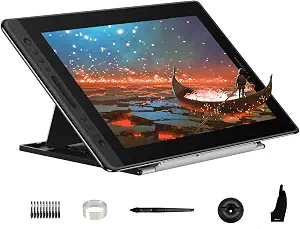
HUION Kamvas Pro 16 Drawing Tablet with Screen
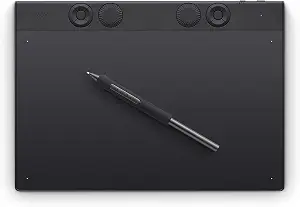
Wacom Intuos Pro Medium, Bluetooth Graphic Drawing Tablet with ProPen 3

PicassoTab 10″ Standalone Drawing Tablet, No Computer Needed, Portable, A10
Best Drawing Tablet Buying Guide — Black Friday Deals 2026
When you sit down to draw, do you want your marks to appear beneath your hand on a built-in screen, or would you rather work on a separate tablet connected to a computer? That choice is a useful starting point for comparing drawing tablets, especially during Black Friday, when a promotional banner can distract from whether a particular setup fits your routine. The three options here cover a computer-connected display tablet, a screenless tablet with customizable controls, and a standalone tablet. Their differences affect where you work, which devices you need, and what controls are available. Before weighing any Black Friday offer, decide how you expect to use the tablet, then check the exact product and variant in the listing.
HUION Kamvas Pro 16 Drawing Tablet with Screen
The HUION Kamvas Pro 16 is a computer-connected drawing display for someone who wants to look at a screen while drawing. Its 15.6-inch full-laminated screen has anti-glare glass, and the listed resolution is 1920×1080. That combination gives you a defined display setup to consider if your creative routine involves drawing at a desk with a computer or laptop. Keep the connection requirement in view: this device must be connected to a computer or laptop to work. It is not the choice in this group for a workflow that depends on the tablet running independently.
For desk habits, the display and controls may be as important as the screen size. The tablet has 6 customized express keys and a touch bar, which gives you dedicated control options to consider when deciding how you want to work. Its pen supports 60° tilt recognition. The stand can be moved between 20 and 60 degrees, allowing you to consider different drawing positions rather than treating the display as fixed at one angle. These are useful details to compare against your own preferred setup, not a promise that any particular position or control arrangement will suit everyone.
The stated compatibility is Windows 7 or later, macOS 10.12 or later, and Linux(Ubuntu). Check your computer’s operating system against that list before comparing a Black Friday offer, and verify the exact listing and included variant rather than assuming a seasonal banner applies to every configuration. The computer connection is a core part of this model’s use, so make sure that arrangement fits the place you intend to draw. If you want a screenless tablet or a device that runs without a computer, compare those workflows directly instead of choosing this one based on its display alone.
Best Overall is the supplied editorial label for this model among the listed options, not a claim of measured superiority or a market-wide award. Its combination of a full-laminated display, adjustable stand, express keys, touch bar, and tilt recognition makes it a candidate for shoppers who specifically want a computer-connected screen tablet. During Black Friday, decide whether that particular setup is worth the offer shown on the exact listing. Check the model, operating-system requirements, and computer-connection condition before purchase; the seasonal framing cannot establish that the tablet fits your equipment or preferred way of drawing.
Key specs
| Display | 15.6-inch full-laminated screen and anti-glare glass |
| Resolution | 1920×1080 |
| Controls | 6 customized express keys and a touch bar |
| Pen tilt | 60° tilt recognition |
| Stand adjustment | moved between 20 and 60 degrees |
| Compatibility | Windows 7 or later, macOS 10.12 or later, and Linux(Ubuntu) |
| Computer connection | this device must be connected to a computer/laptop to work. |
Wacom Intuos Pro Medium, Bluetooth Graphic Drawing Tablet with ProPen 3
Check Price on Amazon
The Wacom Intuos Pro Medium is a screenless drawing tablet for a workflow centered on a Mac or PC rather than drawing directly on a built-in display. Its active area is 8.7 x 5.8 inches, so consider whether that working area suits the way you plan to position the tablet and make marks. The listed connectivity options are Bluetooth, USB-C to USB-A, and USB-C to USB-C. That gives you connection paths to check against the computer and setup you expect to use; confirm the relevant port and connection details for your own equipment in the listing.
Its controls are a notable part of the decision. The tablet has 10 customizable tablet ExpressKeys and 2 mechanical dials. If you prefer to tailor physical controls around your routine, consider which actions you would assign and whether dials are a useful part of your preferred setup. The ProPen 3 is named in the product title, and the listed pressure sensitivity is 8192 levels. Those details may help you compare the specification sheet with your own priorities, but they do not establish that a particular pen feel or control layout will suit every artist.
Compatibility is specified for Windows 10 or later and macOS 13 or later, with compatible devices listed as Mac / PC. Check the operating system on the computer you intend to use before weighing a Black Friday offer. The available connection methods also make it worth checking the exact product listing and your computer’s ports, rather than assuming a particular cable path will work for your setup. This tablet is a different kind of choice from a screen model: consider whether you are comfortable making marks on a tablet while using a separate computer display.
Best for Customizable Controls is the supplied editorial label for this model because its listed features include multiple customizable ExpressKeys and mechanical dials. The label identifies a potential fit, not a test result or proof that it is superior to the other options. If changing or assigning controls is central to your routine, compare those features with the screen and standalone approaches in this guide. During Black Friday, look past the banner and check the exact model, operating-system requirements, active area, and connection options. Decide whether the listed controls and computer-based workflow match your needs before treating an offer as a reason to buy.
Key specs
| Connectivity | Bluetooth, USB-C to USB-A, USB-C to USB-C |
| Pressure sensitivity | 8192 levels |
| Operating systems | Windows 10 or later, macOS 13 or later |
| Controls | 10 customizable tablet ExpressKeys & 2 mechanical dials |
| Active area | 8.7 x 5.8 inches |
| Compatible devices | Mac / PC |
PicassoTab 10″ Standalone Drawing Tablet, No Computer Needed, Portable, A10
Check Price on Amazon
The PicassoTab 10″ Standalone Drawing Tablet is the option here for a shopper who wants drawing to run on the tablet itself. Its listing says no computer is needed, with everything running directly on the tablet. That makes the intended workflow distinct from the computer-connected HUION display and the Wacom tablet designed for Mac or PC. If you want to draw without making a computer connection part of each session, start by checking whether this standalone arrangement fits how and where you plan to work.
The device has a laminated 10″ screen that reduces glare and parallax, a 2000×1200 resolution, and Android 14. It comes preloaded with 5 creative apps for drawing, painting, animation, tutorials, and guided lessons. Those stated details give you concrete points to examine if you want a self-contained creative setup or value having those apps included. The 4096-level pressure-sensitive stylus is another listed specification to compare with your preferences. Consider the listed screen, operating system, apps, and stylus together rather than treating any single feature as a guarantee of a particular drawing experience.
A standalone format changes the practical question from “Which computer will I connect?” to “Does this tablet’s own setup fit my intended use?” Read the listing carefully to understand the exact model and variant offered, and make sure the stated operating system and included creative apps match what you are seeking. If your workflow depends on a computer, compare that requirement with the other two products rather than assuming this tablet connects or works in the same way. The supplied facts establish standalone operation; they do not specify other capabilities or accessories, so check the exact listing for details that matter to you.
Best Budget is the supplied editorial label for this product among the listed choices; it is not evidence of a particular price, saving, or market-wide value ranking. Evaluate the actual Black Friday offer and the exact product variant before deciding whether it fits your budget. The standalone operation, preloaded creative apps, screen, Android 14, and pressure-sensitive stylus are the supported points to weigh against your needs. If avoiding a required computer connection is your priority, this model deserves consideration on that basis. Confirm the listing details rather than assuming that a seasonal promotion or label guarantees a better deal.
Key specs
| Standalone use | No computer needed — everything runs directly on the tablet. |
| Creative apps | Comes preloaded with 5 creative apps for drawing, painting, animation, tutorials, and guided lessons. |
| Display | The laminated 10″ screen reduces glare and parallax |
| Stylus | The 4096‑level pressure‑sensitive stylus |
| Operating system | Android 14 |
| Resolution | 2000×1200 |
Choose the drawing environment you actually want
Start by picturing where your drawing session begins. If you expect to work at a computer and want the image on the drawing device itself, the HUION Kamvas Pro 16 is the screen-based option here, with the important condition that it must connect to a computer or laptop. If you prefer a tablet surface while using a separate computer display, the Wacom Intuos Pro Medium offers a screenless approach and lists Mac / PC compatibility. If you want the work to run on the tablet without a computer, the PicassoTab is specifically described as standalone. These are different working arrangements, so decide which one you want before comparing promotional language.
For Black Friday, treat the workflow as a filter, not a minor detail. A displayed offer cannot make a computer-dependent device standalone, or establish that a screenless tablet suits someone who wants to draw on a built-in display. Write down the equipment you expect to use and where you plan to draw. Then check the product description for the relevant connection or standalone condition. If you are uncertain, compare the exact setup each listing describes before weighing other features.
Match the work surface to your preference
The two screen-equipped choices have different stated display details. The HUION has a 15.6-inch full-laminated screen with anti-glare glass and 1920×1080 resolution; the PicassoTab has a laminated 10″ screen that reduces glare and parallax, with 2000×1200 resolution. Compare those descriptions in relation to your intended setup rather than assuming the larger listed screen or a resolution figure alone decides which tablet is right. The Wacom’s listed active area is 8.7 x 5.8 inches, a useful point of comparison if a screenless tablet is what you want.
Think about whether your preference is to see a drawing on the tablet or work across a separate computer display. Then review the exact Black Friday listing for the screen or working-area details and model you intend to buy. Keep the source wording in mind: glare reduction is stated for both the HUION’s anti-glare glass and the PicassoTab’s screen, while reduced parallax is stated for the PicassoTab. Avoid assuming that a feature listed for one product also applies to another.
Consider which controls belong in your routine
Control layouts matter most when they fit actions you expect to use regularly. The HUION lists 6 customized express keys and a touch bar. The Wacom lists 10 customizable tablet ExpressKeys and 2 mechanical dials. Those descriptions give you a basis for comparing the kinds of controls available, but they do not tell you which layout you will prefer. Ask yourself whether dedicated keys or dials would be useful in your routine, and whether you want customizable controls to be part of your decision.
Pen details should be treated just as specifically. The HUION lists 60° tilt recognition, while the PicassoTab lists a 4096-level pressure-sensitive stylus. The Wacom lists 8192 levels of pressure sensitivity for its ProPen 3. These are product specifications, not a universal measure of drawing quality or a guarantee of personal preference. During Black Friday, check that the listing is for the exact model whose controls and pen details you compared; do not let a promotional heading substitute for checking the specifications.
Confirm the computer and operating-system path
Before choosing a computer-connected tablet, compare the stated operating-system requirements with the computer you plan to use. The HUION lists Windows 7 or later, macOS 10.12 or later, and Linux(Ubuntu). The Wacom lists Windows 10 or later and macOS 13 or later, and identifies Mac / PC as compatible devices. These requirements are not interchangeable, so use the details for the specific model rather than assuming compatibility based on a brand or connection type.
The PicassoTab is listed with Android 14 and is described as needing no computer, with everything running directly on the tablet. That is a distinct arrangement, not a reason to infer unlisted computer compatibility. For any Black Friday offer, check the exact model and variant, then verify that its stated operating system and connection approach fit your plan. If the listing leaves a detail important to you unclear, resolve that question before purchasing rather than treating the seasonal offer as confirmation.
Read the Black Friday offer as a listing to verify
Black Friday can make a product page feel urgent, but the offer itself should not replace a product-fit check. Confirm the model name and exact variant, then compare the supported details that matter to you: screen or active area, controls, pen specification, operating system, and whether a computer connection is required. The products here serve different workflows, so a deal comparison is only meaningful after you have decided which type of setup you want.
Do not assume that a banner establishes a discount, a particular configuration, or that every variant has the same features. Review the precise offer displayed for the item you intend to select, and make sure the specifications you relied on belong to that listing. A practical checklist can be brief: preferred drawing environment, device or computer requirements, operating-system fit, useful controls, and the exact model. That approach keeps Black Friday shopping focused on whether the product suits you, without relying on unsupported assumptions about price or availability.
Make your Black Friday choice
A good choice begins with your preferred drawing setup: a computer-connected screen, a screenless tablet for a Mac or PC, or a standalone tablet that runs directly on the device. Once you know that, compare the listed screen or active area, controls, pen details, and operating-system requirements that matter to your routine. During Black Friday, verify the exact model and variant, the offer shown on its listing, and the connection or standalone conditions before deciding. These checks help you choose by fit rather than by a seasonal banner alone.