Cricut Joy Xtra – Smart Cutting Machine (ASIN B0DCWDJ2GX)
Best Cricut Machine Buying Guide — Black Friday Deals 2026
Choosing a Cricut machine starts with the projects you want to make, not the biggest feature list. These three options cover different needs: a 12 IN (30.5 CM) Explore® 5 bundle, a Maker® 5 bundle that adds material and engraving capabilities, and the Joy Xtra for projects using its listed active surface area. Each has a different mix of tools, supplies, and digital content. During Black Friday, compare the exact model and bundle contents rather than assuming a listing represents a discount or includes the same items as another configuration. The right choice is the one whose documented capabilities and included extras fit your plans.
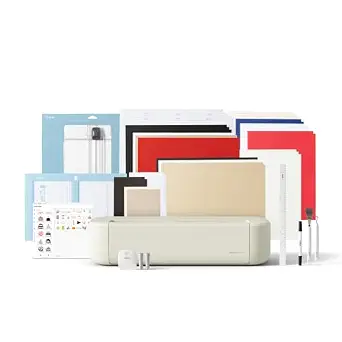
Cricut Explore® 5 Essential Bundle + Digital Content, Taupe
Best Overall is the Cricut Explore® 5 Essential Bundle + Digital Content, Taupe. It combines a 12 IN (30.5 CM) cutting machine with precision cutting for 100+ popular materials, including vinyl, iron-on, cardstock, and printable materials. That range gives a crafter several familiar starting points: cut vinyl designs, prepare iron-on projects, make cardstock pieces, or work with printable materials. The machine also writes, draws, foils, and scores, so it can support projects where a cut is only one part of the design. For someone comparing Cricut machines during Black Friday, this mix makes the Explore a versatile place to begin without moving to the Maker’s specific engraving capabilities.
The included Essential Bundle adds practical supplies to the machine: Smart Vinyl, Smart Iron-On, Value Cardstock, Insert Card Sets, and Printable Vinyl. It also includes 25 additional premium-quality images with purchase, plus 1 font. Those contents make the listing worth checking against your intended first projects; the listed materials may be more useful to one shopper than another, depending on whether they expect to work with vinyl, cardstock, or printable materials. The machine connects through Bluetooth to Design Space, Cricut’s free app. It works with six tools, and the Deep Cutting Tool is sold separately for working with thicker materials like foam and rubber. That qualification matters if thicker-material projects are part of your plan: the machine’s tool compatibility does not mean that every compatible tool is included in this bundle.
This is a sensible Best Overall choice when you want a broad set of listed material options, multiple design functions, and a bundle with several named materials. It is not automatically the right Black Friday pick if engraving is central to your projects, or if the listed bundle supplies do not match what you plan to make. Before buying, check that the product page is for the Essential Bundle in Taupe and confirm the included materials and digital content in the exact offer. Treat the label as a guide among these featured products, not as a claim that every shopper will prefer this configuration.
Key specs
Cutting width
12 IN (30.5 CM) CUTTING MACHINE
Materials
Precision-cuts 100+ popular materials, including vinyl, iron-on, cardstock & printable materials
Functions
this machine writes, draws, foils, scores & cuts intricate designs with precision.
Tool compatibility
Works with six tools, including Deep Cutting Tool (sold separately) for working with thicker materials like foam & rubber.
Bundle materials
The Essential Bundle includes must-have tools and materials like Smart Vinyl, Smart Iron-On, Value Cardstock, Insert Card Sets, and Printable Vinyl.
Digital content
Bundle also includes 25 additional premium-quality images with purchase, plus 1 font.
Connectivity
connect through Bluetooth to Design Space, our free, easy-to-use app
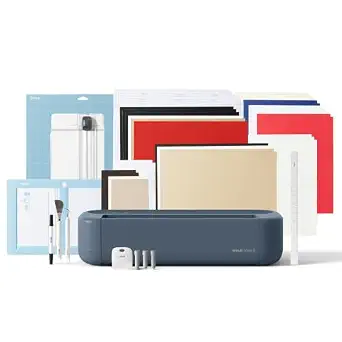
Cricut Maker® 5 Essential Bundle + Digital Content, Slate Blue
Cricut Maker® 5 Essential Bundle + Digital Content, Slate Blue (ASIN B0HDRJGM6V)
Best for material range and engraving is the Cricut Maker® 5 Essential Bundle + Digital Content, Slate Blue. It has the same dependable 12 in (30.5 cm) cutting performance and is listed for popular materials such as vinyl, iron-on, cardstock, and fabric, plus thicker materials up to 3 mm, including leather and foam core board. It also engraves materials up to 3 mm, including metal and acrylic. Those capabilities make it the clearest fit in this group for a shopper whose project ideas specifically include engraving or the listed thicker materials. For Black Friday planning, identify those needs first; choosing this model simply because its feature list is broader may not be worthwhile if your intended work does not use them.
The Maker 5 can cut, engrave, write, draw, foil, score, deboss, and more; specialty tools are sold separately. This bundle names three tools: the Premium Fine Point Cutting Tool, Scoring Tool, and Engraving Tool. It also includes supplies for 65 projects plus bonus digital content, with 25 additional premium-quality images and 1 font. Compare those stated contents with the exact listing: the included Engraving Tool is a particularly relevant detail for a shopper considering engraving, while the broader machine description still notes that specialty tools are sold separately. Do not assume every tool for every function comes in the box.
The Best for material range and engraving label reflects the specific materials and engraving capability provided for this model, not a measured superiority claim. It may suit a crafter who wants to explore fabric, leather, foam core board, metal, or acrylic, within the stated qualifications. If you mainly plan to cut familiar materials and do not need engraving, compare its bundle contents with the Explore 5 instead. During Black Friday, verify the Slate Blue Maker 5 Essential Bundle, its named tools, and the supplies for 65 projects on the offer you are considering. A model name alone is not enough to establish which bundle version a listing contains.
Key specs
Materials
Precision-cuts popular materials like vinyl, iron-on, cardstock, and fabric – plus, thicker materials up to 3 mm, including leather and foam core board.
Engraving
It also engraves materials up to 3 mm like metal, acrylic, and more.
Functions
This Cricut machine cuts, engraves, writes, draws, foils, scores, debosses, and more (specialty tools sold separately).
Bundle supplies
Includes Supplies for 65 Projects + Bonus Digital Content
Bundle tools
the Premium Fine Point Cutting Tool, Scoring Tool, and Engraving Tool
Bonus content
Bundle also includes 25 additional premium-quality images with purchase, plus 1 font.
Cutting performance
the same dependable 12 in (30.5 cm) cutting performance.
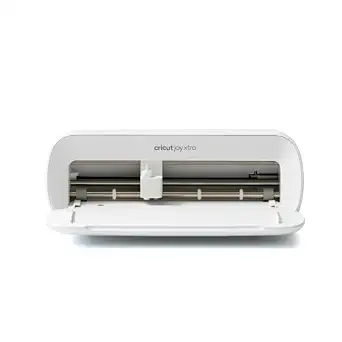
Cricut Joy Xtra – Smart Cutting Machine (ASIN B0DCWDJ2GX)
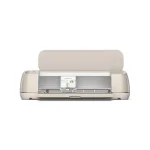
Best Budget is the Cricut Joy Xtra – Smart Cutting Machine. Its stated material compatibility covers 50+ materials, including vinyl, iron-on HTV, cardstock, and stickers. It also supports Print-Then-Cut and is compatible with most inkjet printers. That combination points to useful project possibilities such as cut designs, sticker work, and printed designs that are then cut. The listed active surface area is 95.94 sq in, so shoppers should consider whether that working area suits the projects they have in mind rather than treating the machine as interchangeable with a 12-inch cutting machine. During Black Friday, compare its exact offer with the larger bundles by matching the format and included items to your expected work.
The listed box contents are the Cricut Joy Xtra, Fine-Point Blade, Fine Point Pen, Mini Weeder, Welcome card, USB cable, and Power adapter. The listing also specifies 30 additional premium-quality images. That gives a buyer concrete contents to check when weighing the machine against a bundle that names more materials or tools. The product facts provided here do not specify a bundle of vinyl, cardstock, or other project supplies, so review the exact offer if included materials are important to your purchase. Its listed item weight is 250 g; use that specification as a comparison detail, not as a substitute for checking whether the machine’s active surface area fits your planned designs.
The Best Budget label is an editorial choice among these three featured products, not a claim about current price or a guaranteed Black Friday discount. Joy Xtra may be a fit if its stated material range, Print-Then-Cut compatibility, active area, and included accessories line up with your projects. If you need the Explore 5’s listed 12 IN (30.5 CM) cutting format or the Maker 5’s engraving capability, compare those models directly instead. Before checkout, verify the precise Joy Xtra listing and whether its 30 additional images and listed accessories are included in the offer you are viewing.
Key specs
Material compatibility
works with 50+ materials, including vinyl, iron-on HTV, cardstock, stickers
Print-Then-Cut
Print-Then-Cut feature, compatible with most inkjet printers
Included accessories
Cricut Joy Xtra, Fine-Point Blade, Fine Point Pen, Mini Weeder, Welcome card, USB cable, Power adapter
Digital content
30 additional premium-quality images
Active surface area
95.94 sq in
Item weight
250 g
Let your project examples do the first round of sorting
Write down a few things you genuinely expect to make before comparing feature lists. A plan involving vinyl, iron-on, cardstock, or printable materials gives you a useful starting point with the Explore 5, which is listed for those materials and more. If stickers or printed designs are on your list, Joy Xtra’s Print-Then-Cut feature and compatibility with most inkjet printers are directly relevant. For projects involving fabric or the listed thicker materials, or if you want to engrave metal or acrylic, the Maker 5’s stated capabilities may be a closer match. These are differences to investigate, not reasons to assume one machine suits every project.
Make the list specific enough to separate must-haves from occasional ideas. “I want to make cards” might make the Explore bundle’s Insert Card Sets and Value Cardstock worth checking. “I want to try engraving” points attention to the Maker’s engraving capability and the bundle’s included Engraving Tool. If your ideas center on stickers, Joy Xtra’s listed compatibility and Print-Then-Cut support deserve a closer look. In Black Friday browsing, this short project list keeps a headline or a broad bundle label from becoming the whole decision. It also helps you avoid paying attention to features you are unlikely to use.
Read the material list with its limits in view
Material claims describe specific possibilities, but they do not mean every material works in the same way or that every related tool is included. Explore 5 is listed for precision cutting of 100+ popular materials, with vinyl, iron-on, cardstock, and printable materials among the examples. It works with six tools, while its Deep Cutting Tool is sold separately for thicker materials like foam and rubber. Keep those statements together when deciding whether it meets a particular project need; tool compatibility and bundle contents are separate questions.
Maker 5’s material description goes further into particular categories: popular materials include vinyl, iron-on, cardstock, and fabric, while thicker materials up to 3 mm include leather and foam core board. Its engraving description names materials up to 3 mm such as metal and acrylic. Joy Xtra is listed for 50+ materials, including vinyl, iron-on HTV, cardstock, and stickers. Use the examples as a way to shortlist models, then verify the exact project material and the tools required before purchasing. For Black Friday, do not let a broad phrase such as “material range” replace checking the specific material that matters to you.
Decide whether supplies or tools matter more in the bundle
A bundle can add value for one shopper and little practical benefit for another, so assess its contents against your own project list. Explore 5’s Essential Bundle names Smart Vinyl, Smart Iron-On, Value Cardstock, Insert Card Sets, and Printable Vinyl. Its digital extras are 25 additional premium-quality images and 1 font. Those details may make the bundle appealing if the listed materials and content fit your plans, but do not assume a different Explore listing contains the same items.
Maker 5’s bundle has supplies for 65 projects, bonus digital content, and three named tools: the Premium Fine Point Cutting Tool, Scoring Tool, and Engraving Tool. Joy Xtra lists its machine, blade, pen, Mini Weeder, Welcome card, USB cable, and power adapter, along with 30 additional premium-quality images. These are distinct kinds of included content, so compare the items themselves rather than judging a bundle by how extensive its title sounds. During Black Friday, confirm the exact model, color, and package contents shown for the offer. If a particular material or tool is essential, make sure it is explicitly listed for that version.
Use the working format and workflow as practical filters
The stated working formats are not the same across these choices. Explore 5 is described as a 12 IN (30.5 CM) cutting machine, and Maker 5 has the same dependable 12 in (30.5 cm) cutting performance. Joy Xtra lists an active surface area of 95.94 sq in. Think about the kinds of designs you intend to prepare and whether that specified format works for them. Avoid comparing unlike measurements as if they directly describe the same thing; instead, consult the product page for the machine and offer you are considering.
The workflow details also differ. Explore 5 connects through Bluetooth to Design Space, described as a free, easy-to-use app. Joy Xtra supports Print-Then-Cut and is compatible with most inkjet printers. These are concrete points to consider if app connection or printed designs are part of your planned process. The provided Maker 5 facts focus on materials, functions, bundle contents, and cutting performance; do not assume a workflow detail that is not specified here. Black Friday is a good time to compare these exact features alongside the bundle, but a seasonal offer does not change what a model is documented to do.
Make a Black Friday comparison without assuming a deal
A Black Friday product page can present different models, colors, and bundle configurations close together. Check the full product name before comparing: Explore® 5 Essential Bundle + Digital Content in Taupe, Maker® 5 Essential Bundle + Digital Content in Slate Blue, and Joy Xtra – Smart Cutting Machine are the listed options here. Confirm that the selected offer corresponds to the model you intended to evaluate, then look for the specific bundle contents described for that product. Do not assume a promotion is active or that a similarly named listing contains identical supplies.
Compare offers by practical fit as well as by the displayed terms. First decide whether the project list points toward Joy Xtra’s Print-Then-Cut feature, Explore 5’s stated material and function mix, or Maker 5’s engraving and thicker-material capabilities. Then check the included accessories, tools, supplies, and digital content that matter to you. Review the offer details directly before purchase, since no price, discount, or stock information is established in this guide. A careful Black Friday comparison helps keep the decision grounded in the exact product and configuration rather than a seasonal label.
Make your Black Friday choice
For a broad set of listed cutting materials and functions with named bundle supplies, consider Explore 5; for engraving and the Maker 5’s stated thicker-material range, look closely at that bundle; for Joy Xtra, weigh its active area, Print-Then-Cut feature, and listed accessories against your projects. These are different configurations, not interchangeable answers. Before a Black Friday purchase, recheck the exact model, bundle, and contents on the offer page. Choose the capabilities you expect to use, and treat any displayed deal as something to verify rather than assume.