Best External Ssd Buying Guide — Black Friday Deals 2026
An external SSD can serve as a portable home for project files, a way to move large media between devices, or extra space for a particular workflow. The right choice depends on more than a headline speed: capacity, the connection your device supports, and any specific compatibility or security needs all matter. These three options offer different decision points, from a lightweight 1 TB drive to a 2 TB model with a faster listed interface. Black Friday can make it tempting to focus on the offer first, but compare the exact model and its stated features before deciding whether it suits your routine.
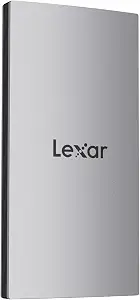
Best Overall is an editorial pick for shoppers who want a broadly useful portable drive and value a clearly stated mix of capacity, speed, device compatibility, and security software. The Lexar ES3 provides 1 TB, with read speeds up to 1050MB/s and write speeds up to 1000MB/s. Those are maximum listed figures, not a promise of identical results across every setup: the product information warns that performance may be lower when a Mac or other system does not support USB 3.2 Gen 2. Check the connection supported by the device you plan to use before treating the headline speeds as decisive.
The listed compatibility spans iPhone 17 series, Android mobile devices, laptops, cameras, Xbox X|S, PS4, PS5, and gaming consoles. The listing specifically says it is not supported on iPhone 14 and older models; shoppers should verify their exact device rather than assume compatibility from the broader list. A Type-C cable is included, which gives a useful detail to check against the ports and connection needs in your setup. At 42g and 10.5mm thick, it has compact stated dimensions for a drive someone may want to carry with a laptop or camera kit.
Lexar DataShieldTM 256-bit AES encryption software is another stated feature for shoppers considering protection for stored data. Encryption software is a separate consideration from physical protection, so decide whether this feature fits your own file-handling needs rather than treating it as a substitute for careful backups. For Black Friday, compare the exact ES3 listing and capacity, then weigh its device list and USB 3.2 Gen 2 qualification against your actual devices. This Best Overall label reflects the combination of provided features among these choices, not a claim of tested superiority. It is a sensible candidate when a 1 TB capacity and the listed mix of connections matter more than choosing solely by capacity.
Key specs
Capacity
1 TB
Read and write speeds
up to 1050MB/s read and 1000MB/s write
Speed qualification
Performance may be lower if not supporting USB 3.2 Gen 2 on Mac and other systems
Compatibility
iPhone 17 series (Not supported on iPhone 14 and older models), Android mobile devices, laptops, cameras, Xbox X|S, PS4, PS5, gaming console, and more
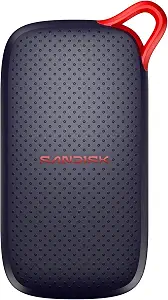
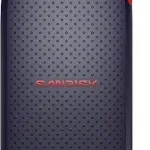
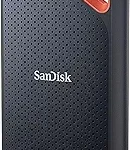
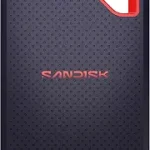
Best Budget is the supplied editorial label for this 1 TB SANDISK Portable SSD. The available facts establish a USB 3.0 interface, read speeds up to 1000 MB/s(2), and drop protection up to 2 meters(3). They do not establish a current price or a Black Friday discount, so the label should not be read as a promise that this drive will be the lowest-priced option when you shop. Instead, use it as a prompt to compare the exact offer with your capacity, connection, and durability priorities.
The listed drop-protection figure may be relevant if you expect to carry a drive between home, work, or a filming location. It describes a stated protection capability, not a guarantee against every kind of damage or mishap. Its weight is 1.12 ounces, and the listed dimensions are 1.77″L x 3.35″W x 0.39″Th. Those details help you judge whether its form is suitable for the pouch, desk, or travel setup where you plan to keep it. The listing gives a read-speed ceiling, but not a write-speed figure in the provided information, so avoid relying on an unstated write rate when planning file transfers.
For Black Friday, compare this model’s exact variant and offer with the other options rather than assuming that a familiar brand or the Best Budget label settles the decision. Check that USB 3.0 matches the connection you intend to use, and consider whether the stated 1 TB is enough for the files you want to keep close at hand. The available specifications do not describe a device-compatibility list, so confirm suitability for your particular computer, phone, or other equipment before purchase. This pick fits shoppers drawn to the stated drop-protection feature and a 1 TB capacity, provided those details align with their needs and the offer itself makes sense.
Key specs
Capacity
Digital Storage Capacity 1 TB
Interface
Hard Disk Interface USB 3.0
Read speed
read speeds up to 1000 MB/s(2)
Drop protection
drop protection up to 2 meters(3)
Weight
Item Weight 1.12 ounces
Dimensions
Item Dimensions L x W x Thickness 1.77″L x 3.35″W x 0.39″Th
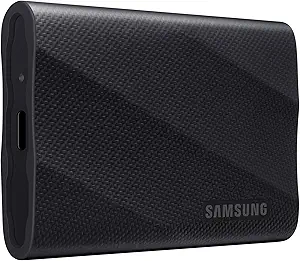
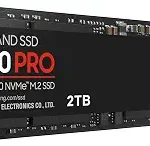
Best for Higher-Capacity Transfers is the editorial label for the Samsung T9 Portable SSD, which offers 2 TB and a listed USB 3.2 Gen 2×2 interface. Its stated speed is up to 2,000MB/s. That combination makes it the capacity-forward choice in this group for someone moving or keeping larger collections of files, while the interface and speed figures give connection details to verify before buying. The maximum speed is not a guarantee for every device or setup; check whether the equipment you will use supports the listed interface.
The T9 lists hardware encryption, a feature worth considering if data security is part of your selection criteria. The product information also states support for iPhone 15 Pro Res 4K at 60fps video, a specific use case that may matter to someone recording that format and frame rate. Treat the compatibility statement narrowly: it establishes that stated use, not support for every iPhone or every recording workflow. Its listed dimensions are 3.46″L x 2.36″W x 0.55″Th, and it weighs 122 g, details that can help you judge how it fits into your everyday carry.
During Black Friday, compare the exact T9 variant and offer, then ask whether the extra capacity and stated interface are useful for your devices and file routine. If your equipment cannot make use of USB 3.2 Gen 2×2, do not select the drive based on its maximum speed alone. Conversely, shoppers needing more room than the 1 TB options provide may find the stated 2 TB capacity a central reason to consider it. The Best for Higher-Capacity Transfers designation is based on those listed capacity and interface details, not a measurement of real-world transfer results. Decide whether hardware encryption and the specific iPhone video support also match your priorities.
Key specs
Capacity
Digital Storage Capacity 2 TB
Interface
USB 3.2 Gen 2×2
Speed
up to 2,000MB/s
Encryption
Hardware Encryption
Dimensions
3.46″L x 2.36″W x 0.55″Th
Weight
122 g
iPhone support
Supports iPhone 15 Pro Res 4K at 60fps video
Start with the files you expect to keep nearby
Capacity is most useful when tied to a real plan. Consider whether the drive will hold a rotating set of work files, a collection of media you want with you, or material you expect to retain for longer. The listed capacities here are 1 TB for the Lexar and SANDISK models and 2 TB for the Samsung. That makes capacity an easy first distinction, but it does not determine which drive is right for every shopper. The files themselves, how often you move them, and whether the drive is a working copy or an additional copy all affect what feels sufficient.
Before Black Friday browsing, make a short list of what the drive needs to accommodate and leave room for files you may add later. Avoid choosing solely because an offer presents a larger capacity: consider whether you will use it and whether the rest of the specifications suit your devices. A 1 TB option may fit a more focused portable-file role, while the 2 TB choice offers greater stated storage among these three. These are capacity distinctions, not predictions about how many photos, videos, or projects a drive will hold; file sizes vary. Let your own library and workflow set the target.
Black Friday speed shopping: check the whole connection
Speed figures need context. The Lexar lists read and write speeds up to 1050MB/s and 1000MB/s, respectively, and its product information warns that performance may be lower if the connected Mac or other system does not support USB 3.2 Gen 2. The SANDISK listing gives read speeds up to 1000 MB/s(2) and identifies a USB 3.0 interface. Samsung lists up to 2,000MB/s with USB 3.2 Gen 2×2. These are product specifications, not assurance that a particular computer will reach the listed ceiling.
Check your device’s port and supported interface before comparing the numbers. Also distinguish read speed from write speed: the provided SANDISK information gives a read figure but no write figure, while the Lexar lists both. If your routine involves saving files to the drive, do not fill in missing details by assuming the read figure applies to writing. During Black Friday, evaluate the exact model against the connection you actually have. A larger headline number only helps your decision when the rest of your setup and the task you care about make it relevant.
Match compatibility statements to your own equipment
A drive’s general category does not establish that it works with every phone, console, camera, or computer. The Lexar’s listed compatibility includes iPhone 17 series, Android mobile devices, laptops, cameras, Xbox X|S, PS4, PS5, and gaming consoles. Its listing also says it is not supported on iPhone 14 and older models. If you use a different device, verify the exact model and connection requirements rather than extending the stated list to products it does not name.
Samsung’s provided compatibility detail is specific: support for iPhone 15 Pro Res 4K at 60fps video. That statement may help a shopper with that precise workflow, but it should not be generalized to other phones or recording settings. The supplied SANDISK facts do not give a device list, so check its listing for your intended equipment. For Black Friday, confirm both the drive variant and the device you intend to connect; a tempting offer is less useful if the compatibility details do not match your setup. If several devices are involved, verify each one independently.
Consider carrying needs, protection, and data security separately
Portable storage has practical details beyond capacity. The Lexar weighs 42g and is 10.5mm thick, while the SANDISK weighs 1.12 ounces and lists dimensions of 1.77″L x 3.35″W x 0.39″Th. Samsung lists a weight of 122 g and dimensions of 3.46″L x 2.36″W x 0.55″Th. These figures can help you think about where a drive will live in your bag or workspace. Keep the listed units and formats in mind when comparing them, and consider the space and handling that suit your own routine.
The SANDISK specifies drop protection up to 2 meters(3), a physical-protection detail. The Lexar lists Lexar DataShieldTM 256-bit AES encryption software, and Samsung lists hardware encryption; those are security-related features, not drop-protection claims. Do not treat one kind of feature as evidence of the other. On Black Friday, decide which details have practical value for you: carrying dimensions, stated drop protection, or encryption. The provided facts do not establish protection from every accident or explain every security workflow, so consult the exact product information when those needs are important.
Use the Black Friday offer as a final check, not the starting point
A deal comparison is only meaningful when the products being compared are the same capacity and variant you intend to buy. Start by matching the model name and storage capacity, then check the interface, stated speed qualifications, compatibility details, and any physical or security feature that matters to you. The product information here does not establish current prices, discounts, availability, or seller terms. Do not assume that a Black Friday label alone means an offer is suitable or represents a saving.
Think through your priorities before opening several listings: for example, whether you need the 2 TB capacity, the Lexar’s stated compatibility breadth, the SANDISK’s drop-protection figure, or a specific encryption feature. Then compare the exact offer with those needs and review the listing for the variant’s details. Avoid substituting a similar-looking model or a different capacity without checking what changes. A deliberate comparison can keep a headline offer from distracting you from the connection or compatibility requirement that will matter after checkout.
Make your Black Friday choice
These choices suit different priorities: the Lexar combines 1 TB with listed device compatibility and encryption software, the SANDISK pairs 1 TB with stated drop protection, and the Samsung offers 2 TB with a USB 3.2 Gen 2×2 interface and hardware encryption. None of those details removes the need to check your own device and intended use. As Black Friday offers appear, compare the exact variant and its stated features rather than assuming a promotion is active or that a headline speed will fit every setup. Choose the drive whose capacity, connection, compatibility, and specific features answer your actual needs.