Best Gaming Desktops Buying Guide — Black Friday Deals 2026
A gaming desktop is a bundle of choices: graphics hardware, processor, memory, storage, and the connections and cooling details that fit your setup. This guide compares three specific configurations, from an ASUS system with a 240mm liquid cooler to an MSI desktop listing an RTX 5070, 32 GB of DDR5, and 2 TB of storage. The recommendations are editorial labels for this group, not measured rankings. During Black Friday, compare the exact product and configuration shown in the offer rather than relying on a broad model name or a discount claim. Think about what you play, how much room your library needs, and which listed features matter most before deciding.
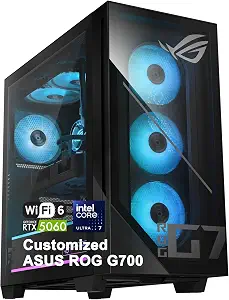
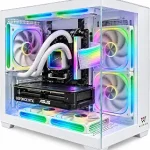
The ASUS ROG G700 AI Gaming Desktop is the Best Overall choice in this selection for shoppers who want a prominently specified processor, graphics card, and cooling system in one listed configuration. Its Intel Core Ultra 7 265KF processor has 20 cores, 20 threads, a maximum speed of up to 5.5GHz, and 30MB Intel Smart Cache. Graphics are handled by an NVIDIA GeForce RTX 5060 with 8GB GDDR7 memory. Those details give shoppers concrete points to compare when they are narrowing a desktop shortlist around both the processor and graphics hardware. They do not, by themselves, establish how a particular game will run; intended games, display setup, and individual expectations still matter. During Black Friday, check that the offer is for this exact ROG G700 configuration before treating its name as a match.
A 240mm liquid cooler is a notable part of this system’s listed specification, while its 600W 80+ Gold power supply gives another concrete detail to review when evaluating the complete desktop. For a desk where wired networking is useful, the listing specifies 2.5Gbps Ethernet as well as Wi-Fi 6. The port description includes multiple USB-A and USB-C ports, DisplayPort 1.4, and audio ports, which gives shoppers a starting point for checking their planned peripherals and display connections. The precise number and arrangement of ports are not provided here, so confirm the listing if a particular connection is essential. The Best Overall label means this is the broadest fit among these featured options based on the supplied combination of details, not a claim of tested superiority. A Black Friday comparison should weigh that combination against the exact offer and the features you will actually use.
Key specs
Processor
Intel Core Ultra 7 265KF processor with 20 cores, 20 threads, up to 5.5GHz, and 30MB Intel Smart Cache
Graphics
NVIDIA GeForce RTX 5060 GPU and 8GB GDDR7 memory
Cooling
A 240mm liquid cooler
Networking
2.5Gbps Ethernet and Wi-Fi 6
Ports
Multiple USB-A, USB-C, DisplayPort 1.4, and audio ports
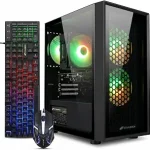
The CyberPowerPC Gaming PC is the Best Budget pick among these three featured desktops, an editorial label rather than a statement about its current price. The listed configuration pairs an AMD Ryzen 7 8700F processor, specified at 4.1GHz with 8 cores, with an NVIDIA GeForce RTX 5060 Ti graphics card with 8GB of graphics memory. It also lists 16GB of DDR5 memory and a 1TB PCIe 4.0 NVMe SSD. For a shopper comparing a ready-made system by its core components, those specifics make the configuration easier to assess than a listing that gives only a broad gaming description. The included operating system is Windows 11 Home. During Black Friday, confirm that the offer still identifies this processor, graphics card, memory, and storage combination; similar product names are not a substitute for checking the configuration.
Wi-Fi 6 and Bluetooth 5.3 are listed for connectivity, and a keyboard and mouse are included. That can be convenient if you are assembling a setup and want to account for input devices as part of the desktop package. It does not mean those accessories will suit every player’s preferences, so consider whether you plan to use your own keyboard and mouse. Likewise, think about how the stated 16GB of memory and 1TB SSD align with your intended games and other uses rather than assuming a capacity will suit every library. The Best Budget designation helps identify this option within the guide, but it does not promise the lowest live price or a Black Friday discount. Compare the exact offer with the other configurations and decide whether its listed components and included devices fit your priorities.
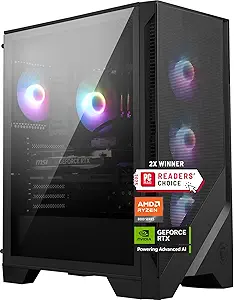
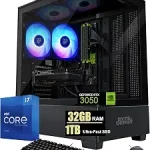
The MSI Codex Z2 is Best for Listed Memory and Storage because its supplied product details call out 32 GB of DDR5 memory and 2 TB of storage. Those are useful figures for shoppers who want to make memory and storage central to a comparison, especially when weighing how much room they want available for games and other files. The graphics specification is an NVIDIA GeForce RTX 5070, and the listed operating system is Windows 11 Home. The product name identifies an AMD R7-8700F processor, but the facts provided here do not give further processor details, so avoid comparing its speed or core count with another system based on this record. During Black Friday, verify the exact Codex Z2 variant and the stated memory, storage, and graphics configuration in the offer.
The listed dimensions are 16 x 8.38 x 19 inches. Use that exact information to consider where the desktop could sit in your space, and check the product listing if you need additional measurements for a particular shelf or desk arrangement. The provided details do not specify cooling, networking, ports, or included peripherals, so shoppers who care about any of those should confirm them before choosing. Their omission from the details here is not proof that a feature is absent. The Best for Listed Memory and Storage label reflects the clear capacity figures supplied for this model, not a claim that it is best for every gamer or that the numbers guarantee a particular experience. For Black Friday shopping, compare the exact offer with your own requirements and confirm that the configuration shown matches the one you intend to buy.
Key specs
Graphics
NVIDIA GeForce RTX 5070
Memory
32 GB
Memory type
DDR5
Storage
2 TB
Operating system
Windows 11 Home
Dimensions
16 x 8.38 x 19 inches
Build your shortlist around the games and setup
Start by describing the setup you want to support, not by choosing a desktop based on one headline component. Consider the games you expect to play, the display and peripherals you already use, and whether the computer will also serve other everyday purposes. The records here provide component details, but not game-specific performance results, so they cannot settle how any particular title will run. Instead, use the listed graphics and processor models as concrete comparison points, then look for configuration information that answers your own questions. The ASUS listing supplies detailed processor information alongside an RTX 5060; the CyberPowerPC listing pairs a Ryzen 7 8700F with an RTX 5060 Ti; the MSI lists an RTX 5070 and identifies an AMD R7-8700F in its name.
Black Friday can make it tempting to focus on a large promotional message or a familiar model family. Keep your shortlist tied to the exact configuration offered. A model name alone may not communicate every component detail you care about, so check the product’s specified graphics card, memory, and storage before comparing it with another desktop. Be clear about which features are essential and which are simply welcome. If your decision depends on an unlisted detail, such as a particular port arrangement, seek confirmation in the exact listing rather than filling the gap with an assumption. This approach makes the eventual comparison more useful than treating these editorial labels as a universal order.
Read the graphics and processor as a pair
Graphics and processor specifications are two distinct parts of a desktop’s configuration. For these options, the ASUS lists an Intel Core Ultra 7 265KF with 20 cores, 20 threads, up to 5.5GHz, and 30MB Intel Smart Cache, alongside an NVIDIA GeForce RTX 5060 with 8GB GDDR7 memory. CyberPowerPC specifies an AMD Ryzen 7 8700F at 4.1GHz with 8 cores and an RTX 5060 Ti with 8GB of graphics memory. MSI lists an RTX 5070 and identifies an AMD R7-8700F in its product name. These details help distinguish the offers, but they are not a complete measure of real-world performance and should not be treated as a direct test comparison.
Use the specifications to decide what information you want to verify for your own games and display. If the graphics model is your first filter, compare the exact listed model rather than relying on a broad description such as gaming PC. If processor particulars are important to you, note where the listing gives precise figures and where the supplied record gives only a model name. During Black Friday, double-check that the offer has not led you to a different configuration within a product family. That simple check is especially useful when you have made a shortlist from model names alone. Choose based on the needs you can articulate, not an unsupported promise about frame rates or a label that implies measured superiority.
Think through memory and room for your files
Memory and storage are worth comparing separately because they describe different parts of the configuration. CyberPowerPC lists 16GB of DDR5 memory and a 1TB PCIe 4.0 NVMe SSD. MSI lists 32 GB of DDR5 and 2 TB of storage. The ASUS facts supplied here do not give memory or storage capacities, so shoppers considering that model should consult its exact listing if those figures will affect the decision. Do not treat an unprovided specification as zero or assume it matches another desktop. Instead, make a small checklist of the capacities you want to confirm before selecting an offer.
Your intended library and other files can help you decide which listed storage figure is more relevant to you, while your own expectations determine whether the stated memory configuration is a fit. This guide cannot promise how much space an individual game or application will require, or how much room will remain after setup. It can help you compare what is explicitly stated. During Black Friday, look beyond a general product title and confirm the precise capacity in the configuration being offered. If a detail matters but is not included in the supplied facts, check the full product information before purchasing. That way, the comparison stays grounded in the actual configuration instead of assumptions based on a neighboring model or a promotional phrase.
Check the practical details around the tower
A desktop has to work in the space and setup you have, so look beyond its headline components. MSI lists dimensions of 16 x 8.38 x 19 inches; use that exact format when considering placement, and confirm any additional measurement you need from its product listing. ASUS specifies a 240mm liquid cooler and a 600W 80+ Gold power supply. These are useful details to have when comparing the stated configuration, but they do not answer every question about a room, desk, or setup. CyberPowerPC’s supplied facts do not include dimensions, cooling, or power-supply information, so check the exact listing if those details affect your choice.
Connections can shape how you plan to use a computer with your existing equipment. ASUS lists 2.5Gbps Ethernet, Wi-Fi 6, multiple USB-A and USB-C ports, DisplayPort 1.4, and audio ports. CyberPowerPC specifies Wi-Fi 6 and Bluetooth 5.3, while the supplied MSI facts do not describe its networking or ports. If you rely on a specific connection, make that a must-confirm item rather than assuming it from a brand or model family. The available ASUS port description does not give an exact port count or layout. Black Friday comparisons are more useful when you verify these practical points against the exact offer, especially if a particular cable, display, or peripheral is central to your setup.
Compare the complete offer, not just the headline
Before choosing, make sure the product page describes the configuration you have been evaluating. Compare the exact processor and graphics model, the stated memory and storage, and the operating system when that information matters to you. CyberPowerPC lists Windows 11 Home and includes a keyboard and mouse. MSI lists Windows 11 Home. The supplied ASUS facts do not specify an operating system or included input devices, so check its full listing if either detail is important. A missing item in this guide is a reason to verify, not a reason to conclude the product lacks it.
During Black Friday, do not assume that a promotional message establishes the value of an offer or that every version of a named desktop has the same components. Compare the exact configuration and the details that matter to your use. Check whether the included keyboard and mouse are relevant to your plans, whether the listed connections suit your setup, and whether the capacities meet your preferences. No current price, discount, or stock information is provided here, so this guide cannot identify a live bargain. The Best Overall and Best Budget labels are editorial distinctions within these featured products, while the MSI label highlights its listed capacities. Your own comparison of the exact offer should make the final call.
Make your Black Friday choice
The right gaming desktop is the one whose verified configuration fits your priorities, space, and planned setup—not simply the one with the most prominent label. ASUS offers detailed processor, cooling, networking, and port information; CyberPowerPC lists its graphics, memory, storage, connectivity, and included input devices; MSI clearly specifies its graphics, memory, storage, and dimensions. Use those differences to identify what you still need to confirm. During Black Friday, compare the exact offer and variant, and treat any unlisted detail as a question for the full product listing. A careful check of the components and practical details is more useful than assuming a promotion makes one configuration right for everyone.