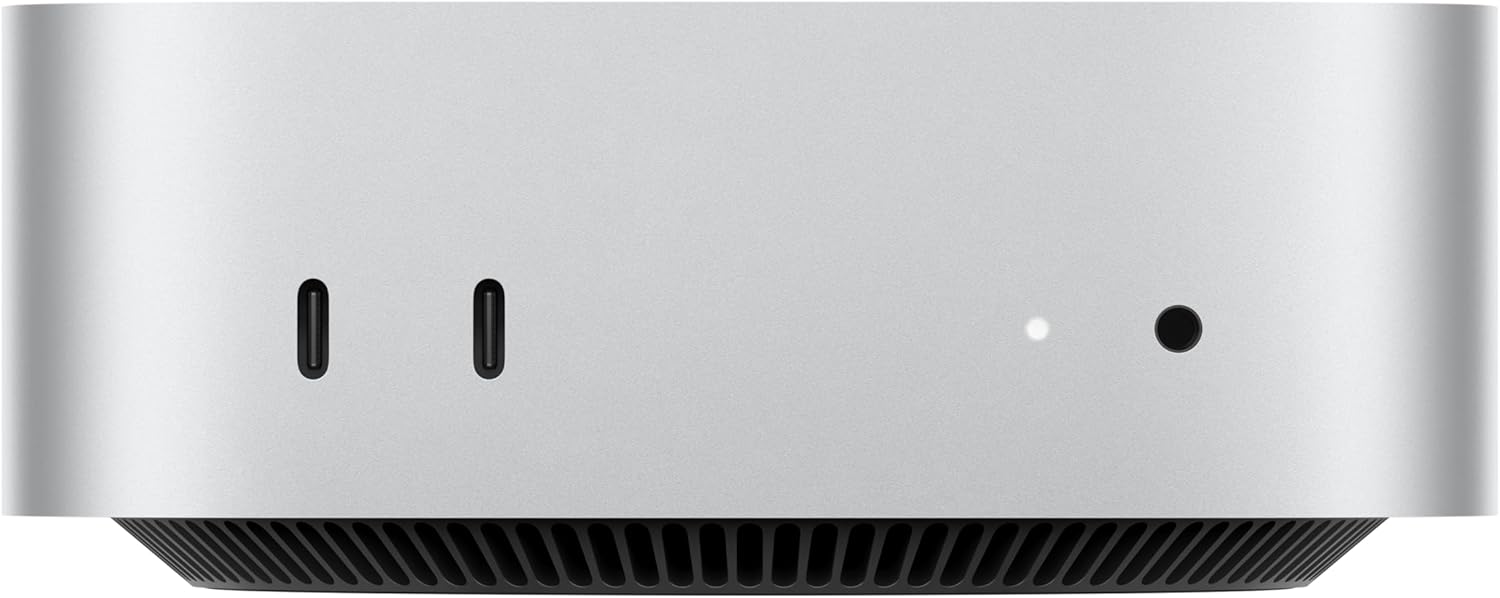
The Exact model listing is “Mac mini with M4 10‑core CPU and 10‑core GPU, 24GB Memory, 1TB Storage”. The product page condition is new. That word describes this listing, not every other version of the same brand.
The Mac mini M4 is Apple’s small desktop with the base M4 chip, not the M4 Pro build. Black Friday Deals 2026 pages mix those two chips, mix memory sizes, and sometimes mix in older M2 minis because the aluminum box looks similar in a thumbnail. The chip name on the configuration line is the product. This guide is about the M4 mini: the ports, the memory floor Apple used for this generation, and the listing details that change what you actually take home.
Mac Mini M4 Black Friday Deals 2026
Apple’s M4 Mac mini is a compact desktop that redesigned the mini’s footprint into a smaller square body. The base M4 configuration uses a 10-core CPU and a 10-core GPU, with a 16-core Neural Engine. The base unified memory on this generation starts at 16 GB, which is a break from older minis that started at 8 GB. Storage on the base model starts at 256 GB. Those two numbers, memory and storage, are the ones sellers change. A mini with 24 GB or 32 GB of memory, or a 512 GB or 1 TB SSD, is a different configuration of the same M4 chip and should be named as such. It is not a different product family, but it is not the base price either.
The M4 Pro mini is a separate configuration with more CPU and GPU cores, higher memory ceilings, and Thunderbolt 5. If the title says Pro, you are not looking at the machine in this article. If the title says only “Mac mini M4” and the specs quietly list Pro core counts, believe the core counts.
Ports on the M4 mini, in Apple’s base layout, put USB-C and a headphone jack on the front, and HDMI, Ethernet, and three Thunderbolt ports on the back. That front USB-C port is the everyday plug for a phone or a drive. Displays connect by HDMI or by USB-C. Confirm the display count you need against Apple’s current tech specs for the M4, because mirror versus extended desktop depends on the resolution you run. The power supply is internal. You do not buy a brick.
Wireless is Wi-Fi and Bluetooth built in. Ethernet on the base model is Gigabit. A 10-gigabit Ethernet option, when Apple offers it on a configure-to-order mini, is a different build. Read the network line if you are wiring a small office.
### What is in the box, and what is not
The carton is the computer and a power lead. There is no keyboard, mouse, or display. A Black Friday “complete setup” is only complete when those extras are written as included items with their own names. A stock photo of a Studio Display does not include a Studio Display. Plan on a monitor you already own or a separate purchase. Any modern HDMI or USB-C display works at a basic level. High-refresh and high-resolution behavior should be checked against the display and against Apple’s spec, not against a deal badge.
Memory cannot be upgraded later. Storage is not a user-swappable stick in this machine. The configuration you buy is the configuration you keep. That is the reason to linger on the 16 GB versus 24 GB line during a sale instead of grabbing the cheapest M4 tile. Sixteen gigabytes is the base Apple chose for ordinary desktop work, browsers, and photo editing of a normal size. People who keep large video timelines or many developer tools open are the ones who step up memory. The article cannot know your apps. It can tell you the choice is permanent.
### Chip identity versus older minis
An M2 Mac mini is still a usable computer and a common renewed listing. It is slower, it belongs to the older chassis, and it is not the M4. An M4 listing that is priced like a used M2 is either a bargain you should read twice or a mislabeled M2. Match the chip printed in the technical details, the year Apple associates with that mini, and the port layout. The front-facing ports are the quick visual for the M4 generation’s redesign. Do not rely on color. These machines are aluminum.
Apple silicon Macs run current macOS builds that Apple still supports for this generation. They do not run Intel apps the old way except through Rosetta when the app requires it, and Rosetta’s future is Apple’s decision, not a seller’s. If you depend on a specific Intel-only utility, test that requirement before a holiday purchase. Most current creative and office software is native.
Reading a Black Friday configuration
Use the spec block, not the headline price.
– Chip line says M4, and the core counts match the base M4, not M4 Pro. – Unified memory is a number you chose: 16 GB or a named upgrade. – SSD capacity is a number you chose: 256 GB or a named upgrade. – The seller is offering a new mini or a clearly renewed one. Renewed should describe cosmetic condition. – Keyboard, mouse, display, and extra cables are included only if listed. – The power plug region matches your wall.
A crossed-out education or “was” price is not a fact you can audit from the living room. Compare two carts with the same chip, memory, and SSD. A 256 GB base next to a 1 TB model is not the same computer on sale.
Black Friday does not add ports or memory after checkout. Configure first, then look at the offer. If you are buying from a third-party seller rather than a retailer that can supply Apple’s warranty, read who handles a fault in the first weeks. A mini has no user-serviceable storage, so “we will send a screwdriver” is not a repair plan.
Who it is for
Choose the M4 mini if you want a small desktop for writing, coding, photo work, and everyday browsing, and you already have a display and input devices. It is the wrong box if you need the M4 Pro’s extra cores and Thunderbolt 5, or if you wanted a laptop. It is also the wrong box if your software requires Windows on the bare metal. Virtualization is a separate project with its own limits.
For a family machine, 16 GB and a larger SSD are often the calmer pair, because photos fill a 256 GB drive faster than the processor runs out of breath. That is a storage observation, not a price claim. Pick the capacity whose number you can live with in two years.
After it arrives
Connect a display, a keyboard, and a mouse, then turn it on and complete the macOS setup on a network you trust. Sign in with your Apple Account if you want iCloud, and decide on FileVault only after you know you have a recovery path. Run Software Update before you install a pile of apps. Check About This Mac and confirm the chip says M4 and the memory matches the order. If it does not, stop and use the return window. That screen is the identity check.
The Mac mini M4 is a small desktop with a fixed M4 configuration. Black Friday Deals 2026 are worth taking when the chip, the memory, and the SSD on the order are the ones you meant, and the carton is not pretending to be a Pro or an older generation.