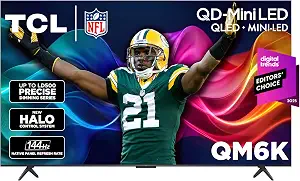
TCL 55 Inch QM6K Series QLED Mini LED 4K HDR Smart Google TV, 55QM6K, 144Hz
INSIGNIA 55-inch Class F50 Series LED 4K UHD Smart Fire TV with Alexa Voice Remote (NS-55F501NA26)
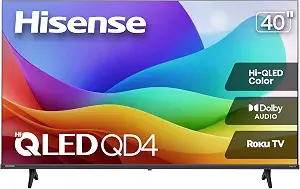
Hisense 40-Inch Class QD4SR Series Hi-QLED FHD Smart Roku TV (40QD4SR, 2026 Model)
Best Online Tv Buying Guide — Black Friday Deals 2026
An online TV search can quickly turn into a comparison of names that sound alike but point to different priorities. Start with the constraint that matters most in your room: screen size, picture format, smart-TV platform, or the connections you need. This guide focuses on three distinct options, from a 55-inch QLED Mini LED model to a compact 1080p Roku TV. For Black Friday, treat the advertised offer as only one part of the decision. Confirm the exact model and screen-size variant, then check that its listed features match your viewing habits before comparing the final offer.
TCL 55 Inch QM6K Series QLED Mini LED 4K HDR Smart Google TV, 55QM6K, 144Hz
Check Price on Amazon
Best Overall is the editorial choice here for shoppers who want a feature-rich 55-inch 4K set and have room for its larger screen. The TCL QM6K combines QLED Mini LED display technology with a 144Hz native refresh rate. That refresh-rate specification may matter to shoppers who want to consider a higher-refresh display for compatible viewing or play, while the 4K resolution gives the set a clear place on a shortlist for detailed, high-resolution content. Those specifications describe the model; they are not a promise about how any particular program or device will look.
The HDR format list is broad: Dolby Vision, HDR10+, HDR10 and HLG. If you already choose content based on HDR support, use that list to compare the specific formats you care about with the content and devices you use. The built-in ONKYO 2.1 speaker system includes a subwoofer, a detail worth weighing if you prefer to begin with the TV’s onboard audio rather than plan an audio purchase immediately. The listing also specifies four HDMI ports, useful to review against the number of sources you expect to connect. AirPlay 2 and Google Cast are listed for screen mirroring, and the set uses Google TV.
Before buying, check that the listing is for 55QM6K rather than a similarly named TCL size or series. Confirm the offer applies to that exact variant; a Black Friday deal headline alone does not establish that it is the model you meant to compare. For a wall installation, the listed VESA mount pattern is 300 x 300 mm, so compare it with your mounting hardware before checkout rather than assuming it will fit. Also consider how the 55-inch screen suits your room and furniture. This pick is most relevant when its combination of resolution, refresh rate, HDR formats, audio details and smart features aligns with your priorities. Best Overall is a guide to this selection, not a claim of measured superiority over every TV.
Key specs
| Screen size | 55 inches |
| Resolution | 4K |
| Native refresh rate | 144hz Native Refresh Rate |
| HDR formats | Dolby Vision, HDR10+, HDR10 & HLG |
| Audio system | ONKYO 2.1 Speaker System with built-in subwoofer |
| HDMI ports | Total Number of HDMI Ports 4 |
| Screen mirroring | AirPlay 2, Google Cast |
| VESA mount | 300 x 300 mm |
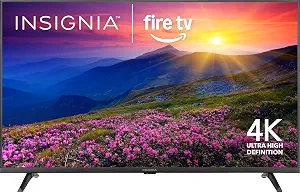
INSIGNIA 55-inch Class F50 Series LED 4K UHD Smart Fire TV with Alexa Voice Remote (NS-55F501NA26)
Check Price on Amazon
Best for FireOS shoppers is the INSIGNIA 55-inch F50 Series, a 4K UHD LED smart TV with FireOS and an Alexa Voice Remote, as named in its product listing. This label identifies the platform-focused reason to consider it; it does not imply that FireOS is the right interface for everyone. If you already prefer FireOS, make the operating system a deliberate part of your comparison rather than choosing from screen size or resolution alone. Its 55-inch size and 4K resolution also put it on the list for shoppers looking for a larger 4K option.
The listed HDR support is HDR10. Check that against the formats you seek when choosing content and devices, and avoid treating a general HDR label as interchangeable with a particular format. The TV has three HDMI ports, so count the sources you expect to connect and decide whether that arrangement fits your setup. Bluetooth and Wi-Fi are listed as wireless technologies, and Apple AirPlay is included among the additional features. These details can help you compare everyday connection and mirroring needs without assuming support for features not stated in the listing.
Wall-mount shoppers can use the specified VESA mount standard, 200 x 200 mm, as a compatibility check against their mounting equipment. Verify the full model number, NS-55F501NA26, on the listing before ordering, especially when a Black Friday offer presents multiple sizes or related products together. Compare the exact offer for this variant with the features you actually want: FireOS, the included Alexa Voice Remote, 4K resolution, HDR10 support, port count and AirPlay. The offer itself does not establish a discount or indicate that another configuration has the same terms. If you are choosing between this set and another 55-inch option, write down the platform and format differences that matter to you instead of assuming that a shared screen size makes the models equivalent.
Key specs
| Screen size | Screen Size 55 inches |
| Resolution | Resolution 4K |
| HDR format | Screen Finish Led Display HDR Format Supported HDR10 |
| Operating system | Operating System FireOS |
| HDMI ports | Total Number of HDMI Ports 3 |
| Wall mounting | VESA Mount Standard 200 x 200 mm |
| Wireless connectivity | Wireless Technology Bluetooth, Wi-Fi |
| AirPlay | Additional Features Apple Airplay |
Hisense 40-Inch Class QD4SR Series Hi-QLED FHD Smart Roku TV (40QD4SR, 2026 Model)
Check Price on Amazon
Best Budget is the editorial label for the Hisense 40-inch QD4SR, a 2026 model with 1080p resolution, a 60Hz refresh rate and Roku OS. It makes sense to consider when your purchase constraint is a smaller screen or when Full HD is sufficient for the room and the material you watch. The Roku platform is a useful point of comparison if you prefer that interface. The label does not mean this will be the lowest-priced TV available, or that a particular Black Friday offer represents the best value; compare the actual listing and exact model before deciding.
Think through where a 40-inch set would be used. It may suit a room where a larger screen would be inconvenient, or a household looking for a secondary screen, provided the size and resolution meet the intended use. The supplied specifications list two-channel speakers with Dolby Audio. If onboard sound is part of your decision, treat that as a specific feature to compare, not as a substitute for hearing the set in your own room. There are three HDMI ports, so write down the devices you want connected and check whether that count fits your setup. The listing also gives a VESA mount standard of 100 x 200 mm for shoppers planning a wall installation.
For a Black Friday comparison, confirm the product page identifies the 40QD4SR 2026 model and not another Hisense screen size or series. Check that the offer is for the variant you intend to buy, and compare the final terms shown on the listing rather than assuming the headline applies to every option. Its specified dimensions are 3.1″D x 35.4″W x 20.1″H; use those exact figures when checking furniture or available space. The model name and provided specifications make this a straightforward candidate when you value a compact size, Roku OS and 1080p resolution over a larger 4K screen. Best Budget is an editorial role among these three selections, not a price guarantee or a market-wide award.
Key specs
| Resolution | Resolution 1080p |
| Refresh rate | Display Refresh Rate in Hertz 60 |
| Operating system | Roku OS |
| HDMI ports | Total Number of HDMI Ports 3 |
| Speakers | 2.0 Channel Speakers with Dolby Audio |
| VESA mount | VESA Mount Standard 100 x 200 mm |
| Dimensions | 3.1″D x 35.4″W x 20.1″H |
Set a room-and-use limit before browsing
A useful online TV shortlist begins with the space and the job the screen needs to do. Measure the furniture or wall area available, consider where viewers will sit, and decide whether the TV is meant for the main room or a smaller space. The products here span a 40-inch model and two 55-inch models, so screen size is a real distinction rather than a detail to leave until checkout. Use the dimensions supplied for the Hisense when checking a particular surface; for the larger sets, verify the dimensions on the exact listing before arranging furniture or a mount.
Next, decide what resolution makes sense for your viewing plans. The two 55-inch options are listed as 4K, while the Hisense is 1080p. That gives you a concrete comparison, but it does not by itself settle the purchase: your preferred size, content, room and budget all matter. During Black Friday browsing, keep a written note of the desired size and resolution so an appealing headline does not pull you toward a variant that misses your original requirement. Then open the product page and confirm the model and size before treating its offer as a candidate.
Make the Black Friday offer prove its match
For a Black Friday purchase, separate the product decision from the offer decision. First select the model that fits your needs; then inspect the exact listing and variant being offered. A product family may include different screen sizes or model identifiers, and an offer page may present options together. Check the name and model number against the TV you intended to compare. Do not infer that a displayed deal applies to every size or configuration, or that a deal headline tells you the final price, availability or seller terms.
Build a small comparison worksheet with the model, screen size, resolution, operating system and the feature that made you shortlist it. Add the offer details shown for that exact selection, and compare only like-for-like listings. If the variant changes when you select a size, recheck its specifications instead of carrying over details from the previous selection. This approach is especially helpful when an online page uses a shared product family name. A Black Friday label can draw attention, but the practical decision is whether the specific TV and its displayed terms suit your requirements. Leave any unclear model or offer detail unresolved until the listing makes it clear.
Choose the interface you will actually use
Smart-TV software shapes the menus and routine navigation you will encounter, so put platform preference on your worksheet. The TCL is identified as a Google TV, the Hisense uses Roku OS, and the INSIGNIA runs FireOS. If you already favor one interface, that can be a useful tie-breaker between models with otherwise relevant screen sizes. If you do not have a preference, compare the named platforms without assuming that one includes a particular app, service or feature that is not listed here.
Mirroring details can also help narrow the choice. The TCL lists AirPlay 2 and Google Cast; the INSIGNIA lists Apple AirPlay. The Hisense facts provided identify Roku OS but do not specify a mirroring feature, so check its listing if mirroring is important rather than drawing a conclusion from that omission. During Black Friday, avoid letting a smart-platform label stand in for a full model check. Confirm the TV variant and the precise feature description, then consider whether the interface and mirroring information fit your household’s devices and habits.
Map your sources, sound and mounting plan
Count the devices you expect to connect, such as a console, player or other source, then compare that list with the HDMI-port count in the product details. The TCL lists four ports; the INSIGNIA and Hisense each list three. This is a planning check, not a claim about which set will work better. If you might add a device later, decide whether the listed count leaves enough room for your setup. Confirm the information for the exact model rather than relying on a generic series description.
Sound and installation deserve their own checks. The TCL lists an ONKYO 2.1 speaker system with a built-in subwoofer, while the Hisense lists two-channel speakers with Dolby Audio. The provided INSIGNIA facts do not describe its audio system, so use its listing for any sound requirement you consider essential. For a wall mount, compare the TV’s stated VESA pattern with your mount: the listed patterns differ across these models. Black Friday is a poor reason to skip that fit check. Verify the exact product and mounting information before purchase, and consider whether the set’s listed onboard audio meets your plan.
Read picture formats as specific requirements
Instead of treating labels such as 4K, QLED or HDR as a complete picture-quality verdict, turn them into questions about what you need. The TCL is described as QLED Mini LED with 4K resolution and lists Dolby Vision, HDR10+, HDR10 and HLG. The INSIGNIA is a 4K UHD LED model with HDR10 support. The Hisense is listed at 1080p. These are useful distinctions for organizing a shortlist, but they do not establish how a program will appear in your home or whether a format is important for your viewing.
Refresh rate is another specification to consider in context. The TCL lists a 144Hz native refresh rate, while the Hisense lists 60Hz. If refresh rate matters to you, compare the exact stated value and think about the content and devices involved rather than assuming a general benefit in every situation. For Black Friday, keep a note of the formats and specifications that are must-haves, then verify them on the selected variant’s page. That turns a broad product label into a concrete check without relying on unprovided performance claims or treating a deal as proof of picture quality.
Make your Black Friday choice
A good online TV decision is less about chasing every Black Friday headline and more about matching one exact model to your space, platform preference, connections and picture priorities. The TCL is the Best Overall selection for its supplied combination of features, the Hisense is the Best Budget editorial pick for shoppers considering its compact 1080p Roku configuration, and the INSIGNIA is the Best for FireOS shoppers choice. Compare the exact variant and offer, confirm any installation requirements, and choose the option whose listed details answer your real needs. That final check makes the purchase decision clearer without assuming a promotion or feature beyond what the listing states.