Best Printer Buying Guide — Black Friday Deals 2026
A printer purchase is easier to judge when the machine’s everyday job is clear: occasional color pages, a steady flow of paperwork, or a mix of printing and scanning. This guide compares three all-in-one options with different approaches to ink, paper handling and document pace. The Epson EcoTank ET-2900 emphasizes refillable tanks and a stated included-ink yield; the HP DeskJet 2923 combines color printing, copying and scanning; and the Brother DCP-L2640DW focuses on monochrome document workflows. During Black Friday, treat a headline offer as a starting point, not a reason to buy. Check the exact model and included setup, then decide whether its features fit the pages you expect to handle.
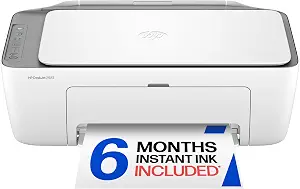
HP DeskJet 2923 Color Inkjet Printer (ASIN B0GMW9XT9X)
Best Budget is the editorial label assigned to the HP DeskJet 2923 for shoppers looking at a color all-in-one with a clearly described set of core functions. It prints, copies and scans, and its input tray holds 60 sheets. The label does not claim that this is the lowest-priced printer or that a Black Friday offer will make it so. Instead, use it as a prompt to compare the actual offer with the functions you need. If routine tasks include printing a form, copying a page or scanning a document, this model puts those jobs together in one listed device.
The DeskJet’s stated print speeds are up to 7.5 ppm in black and 5.5 ppm in color. Duplex printing is manual, with driver support provided, so shoppers who regularly want two-sided pages should consider whether manually managing that process suits them. Maximum color print resolution is up to 4800 x 1200 optimized dpi under the stated conditions: printing from a computer on selected HP photo papers with 1200 input dpi. Keep that qualification in view when comparing specifications; it describes a specific setup rather than an unconditional result for every print job.
Connectivity options include Apple AirPrint, USB, Wi-Fi, wireless direct printing and Mopria. That range gives different kinds of users options to consider, but check that the connection method you plan to use is supported by your own setup. Its dimensions are 11.97″D x 16.73″W x 6.06″H, useful details to compare with the space you have available. Around Black Friday, verify the model name and the exact offer before making a decision. The DeskJet may be a reasonable shortlist choice when color, copying and scanning matter more than an automatic duplex workflow; the tray capacity and manual duplex method are the practical tradeoffs to keep in mind.
Key specs
Functions
Color print, copy, scan, and a 60-sheet input tray, plus mobile and wireless printing
Print speed
Up to 7.5 ppm black, 5.5 ppm color
Connectivity
Apple AirPrint; USB; Wireless (Wi-Fi); Wireless direct printing; Mopria
Duplex
Manual (driver support provided)
Maximum color print resolution
Up to 4800 x 1200 optimized dpi color (when printing from a computer on selected HP photo papers and 1200 input dpi)
Dimensions
11.97″D x 16.73″W x 6.06″H
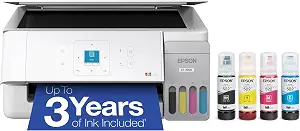
Epson EcoTank ET-2900 Wireless All-in-One Color Supertank Printer
Epson EcoTank ET-2900 Wireless All-in-One Color Supertank Printer (ASIN B0GSSGLV8D)
Best Overall is the editorial label for the Epson EcoTank ET-2900 because its listed features cover several common needs in one package: color printing, scanning, Wi-Fi, a 100-sheet paper tray and a refillable ink-tank system. The label is a guide to this particular selection, not a claim of measured superiority. For a household or small work area that prints a mix of documents and color pages, the combination gives shoppers several practical details to weigh together rather than focusing on one specification alone.
The ink supply is the model’s clearest point of distinction. Epson says the included ink can last up to 3 years, with a stated yield of up to 3,600 black pages and 6,500 color pages. Those are stated maximum yields, not a promise about every person’s experience; actual needs depend on what and how much you print. Supersized tanks and uniquely keyed EcoFit bottles are intended to make refilling simple. If you are comparing this during Black Friday, look at the exact ET-2900 offer and confirm what is included rather than assuming every listing or package is identical.
The ET-2900 lists print speeds of 11 black/6 color ISO ppm, Wi-Fi connectivity and a high-resolution flatbed scanner. A flatbed can be useful when you want to scan individual pages or items placed on the glass; the listing does not establish an automatic document feeder, so consider how you handle multi-page scanning before choosing. The 1.44-inch color display is another listed control feature. This model makes sense to shortlist if the tank system and stated included yield suit your printing routine. Its tradeoff is that shoppers should assess whether its documented features—not an assumed speed or feeder—match their particular workflow.
Key specs
Ink supply
Epson EcoTank includes enough ink to last up to 3 years
Included ink yield
WORRY-FREE PRINTING — Epson EcoTank comes with enough ink to print up to 3,600 pages black/6,500 color
Ink refill system
Supersized ink tanks and uniquely keyed EcoFit bottles make refilling ink simple
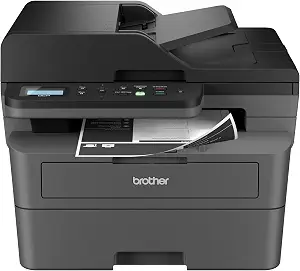
Best for Fast Document Workflows is the editorial label for the Brother DCP-L2640DW, grounded in its stated print speed of up to 36 ppm and its 50-page auto document feeder. It is a monochrome multifunction printer, so it is the option here to consider when your routine centers on black-and-white documents rather than color output. The label describes why this model stands out in this group; it is not a report of comparative testing. Think about whether the speed specification and feeder address the tasks that actually take time in your work or household.
The auto document feeder can be relevant when a job involves a stack of pages, while Auto-Duplex is listed for two-sided printing. Together, these features may suit recurring document jobs where feeding pages and managing duplex output are part of the routine. Maximum media size is 8.5 x 14 inch. These details are more useful than a broad promise of convenience: consider the size of documents you need to handle and whether automatic feeding and duplex printing fit your normal process. The provided information does not state an automatic duplex scanning function, so do not assume that feature from the feeder listing.
The Brother offers built-in dual-band wireless at 2.4GHz / 5GHz and Ethernet, giving shoppers wireless and wired connection types to evaluate. Compatible toner is listed as TN830 and TN830XL; check the specific toner designation when comparing the printer and any related Black Friday offer. The useful tradeoff is straightforward: its documented strengths focus on monochrome output and document handling, rather than color printing. If color pages are important, compare the other options in this guide; if your workload is primarily documents and you value a feeder, Auto-Duplex and the stated speed, this model merits consideration. Confirm the exact model and included items before treating an offer as comparable.
Key specs
Print speed
print speeds up to 36 ppm(2)
Document feeder
A 50-page auto document feeder(4)
Wireless
built-in dual-band wireless (2.4GHz / 5GHz)
Wired connections
Ethernet
Duplex
Auto-Duplex
Maximum media size
8.5 x 14 inch
Compatible toner
TN830, TN830XL
Choose a printer by the jobs you repeat
Start with a realistic description of your printing week. If you mostly produce black-and-white paperwork, the Brother’s monochrome design and stated speed of up to 36 ppm may be more relevant than color functions. If color output, copying and scanning all belong in the same routine, the HP lists those functions, while the Epson combines color printing with a scanner and a refillable tank system. These are different fits, not interchangeable answers. Make a short list of the tasks you expect the machine to perform, then use that list to narrow the choice before browsing offers. During Black Friday, a prominent deal can make a product seem appealing even when its main strengths do not match your needs. Compare the model’s documented functions with your ordinary tasks, including occasional jobs such as scanning paperwork or printing color pages. A printer that fits those tasks is a more useful purchase than one chosen only because its offer attracts attention.
Think through ink before comparing offers
The Epson’s EcoTank system uses supersized tanks and uniquely keyed EcoFit bottles, and its listing states that the included ink can last up to 3 years. It also gives an included yield of up to 3,600 black pages and 6,500 color pages. Treat these as stated maximums, not a guarantee of how long the supply will last in your particular routine. The HP and Brother records do not provide comparable ink or toner yields here, so avoid drawing a cost-per-page conclusion from this information alone. Instead, ask what supplies the offer includes and what replacement supply the exact model uses. The Brother lists TN830 and TN830XL as compatible toner; that designation can help you check a listing’s details. For Black Friday, compare the printer and its stated supplies as a package, without assuming an advertised offer includes extra consumables or that one option will necessarily cost less to run. Your print volume and the pages you produce are part of that decision.
Match paper handling to your real workload
Paper capacity and document feeding affect different parts of a routine. The HP has a 60-sheet input tray, while the Epson lists a 100-sheet paper tray. Those figures describe tray capacity, not how often you personally will need to reload it. The Brother’s 50-page auto document feeder addresses another task: handling a stack of documents for a workflow involving the feeder. It also lists Auto-Duplex, whereas the HP’s duplex method is manual with driver support provided. Do not treat a document feeder as proof of automatic two-sided scanning; the supplied details do not make that claim. Consider whether you mainly print occasional pages, keep paper in a tray for recurring jobs, or need to work through multi-page documents. Black Friday comparisons are more meaningful when you distinguish these functions instead of grouping all paper-handling features under a vague idea of convenience. Choose the feature that solves a specific repeated task, and check the model’s stated limits against the documents you expect to use.
Check connections, controls and placement
The listed connection choices differ, so start from the device or network you expect to use. The HP specifies Wi-Fi, USB, wireless direct printing, Apple AirPrint and Mopria. The Epson lists Wi-Fi. The Brother lists built-in dual-band wireless at 2.4GHz / 5GHz and Ethernet. These facts can help you identify which printer to investigate, but check that your own equipment and preferred connection method are supported before buying. For placement, the HP’s dimensions are 11.97″D x 16.73″W x 6.06″H; compare that exact format with the space available rather than relying on a product category label such as compact. The Epson lists a 1.44-inch color display, another concrete detail if an onboard display matters to you. During Black Friday, make sure the listing corresponds to the same model you researched and verify the stated connection features on that offer. A product image or a generic description should not substitute for checking the exact model information.
Read the Black Friday offer as a complete purchase
A Black Friday headline does not tell you whether a printer is the right match, what the exact offer contains, or whether another model’s features would serve you better. Compare like with like: confirm the model name, review the listed functions, and check what supplies or accessories the specific offer says are included. Do not infer a discount, bundle or stock status from a promotional label alone. Then revisit the decision that matters most to you. The Epson’s stated included-ink yield may be worth considering if its tank approach fits your needs; the HP offers color print, copy and scan functions with several listed connection methods; the Brother emphasizes monochrome document handling with an auto document feeder and Auto-Duplex. These distinctions remain useful whether or not a particular offer looks compelling. Set your requirements first, then compare the exact offer details and decide whether the printer’s documented features justify your choice. That process helps keep a seasonal promotion in perspective without assuming a sale is automatically the best option.
Make your Black Friday choice
For a color all-in-one with refillable tanks and a stated included-ink yield, consider the Epson; for color printing, copying and scanning in a smaller listed tray capacity, weigh the HP; for monochrome documents and a feeder-focused workflow, consider the Brother. Each recommendation label is an editorial guide to the features described, not a guarantee that one printer suits every buyer. Before choosing, check the exact model, the tasks you need it to handle, the supply details and the specific offer. Black Friday can be a useful time to compare options, but the best decision is the one that fits your routine and remains sensible after the headline has been set aside.