Best Soundbars Buying Guide — Black Friday Deals 2026
A soundbar can be a straightforward way to add a dedicated audio component to a TV setup, but the right choice depends on your connection options, available space and interest in a separate subwoofer. This guide compares three distinct approaches: the Bose TV Speaker, Amazon Fire TV Soundbar and TCL S55H 2.1 Sound Bar with Wireless Subwoofer. For Black Friday, treat the advertised deal as a prompt to compare—not a reason to skip checking the model and configuration. Start with the job you want the bar to do, then confirm the listing’s exact product and included components before deciding.
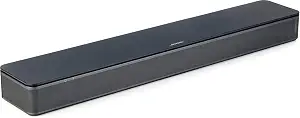
Best Overall is an editorial pick among the three products in this guide, not a claim of measured superiority. The Bose TV Speaker makes a useful starting point if you want several ways to connect a TV and value an accessible way to adjust speech or bass. Its two angled full-range drivers are a defining part of the listed setup. The bar measures 2.21″ H x 23.38″ W x 4.02″ D, so compare those dimensions with the space where you plan to place it before pursuing a Black Friday offer.
For TV audio, the Bose can connect by optical audio or HDMI ARC. The optical cable is included; an HDMI cable is sold separately. Bluetooth 4.2, optical in, HDMI ARC and AUX in are listed connections, with up to three devices connectable through the HDMI, optical and AUX inputs. That combination may suit a household that wants to keep a TV connection while also considering other input options. Check the exact listing and your TV’s available ports to decide which cable route works for your setup; don’t assume a cable is included unless the offer says so.
The remote’s dialogue mode is intended to further enhance speech, while its bass boost adds depth. Those controls give you specific adjustments to consider if you often switch between dialogue-focused viewing and content where you want more bass. If you later want a separate Bose bass module, the speaker is compatible with the Bass Module 500 or 700. A Bose Bass Module Connection Cable or standard 3.5 millimeter audio cable is required, and is sold separately. Account for that extra component and cable when comparing the total Black Friday offer. The Bose is a good fit to investigate when connection choice and those remote controls matter more to you than choosing a package already described with a wireless subwoofer.
Key specs
Dimensions
2.21″ H x 23.38″ W x 4.02″ D
Drivers
2 angled full-range drivers
Connectivity
Bluetooth version: 4.2 / HDMI ARC (Audio Return Channel) / Optical in / AUX in / USB (for service only)
Device connections
Connect up to 3 devices through the inputs (HDMI, Optical in, and AUX in)
TV setup
via an optical audio cable (included) or an HDMI cable (sold separately)
Remote control
enables a dialogue mode to further enhance speech or add a bass boost for more depth
Bass module compatibility
compatible with the Bose Bass Module 500 or 700 and requires the Bose Bass Module Connection Cable or a standard 3.5 millimeter audio cable, sold separately.
TCL S55H 2.1 Sound Bar with Wireless Subwoofer for Smart TV
TCL S55H 2.1 Sound Bar with Wireless Subwoofer for Smart TV (ASIN B0D1JBBJ6S)
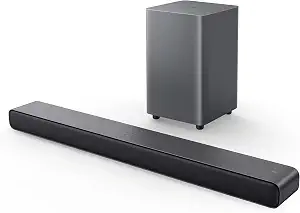
Best for a wireless-subwoofer setup is a label grounded in the TCL S55H’s listed configuration: it is a 2.1 sound bar with a wireless subwoofer. The connection between the subwoofer and soundbar is wireless, which may appeal if you want that component without a connecting wire between the two. Consider where both pieces would go, and check the exact listing for the package you intend to buy. The label describes a feature-based choice among these products; it does not promise better sound than another model.
The TCL lists Dolby Atmos, DTS Virtual:X and Surround Sound, along with a maximum output of 220 watts. It also includes AI Sonic Auto Room Calibration as a listed feature. These are useful details to weigh if format names and room calibration are part of your shopping priorities, but they cannot replace checking what your own TV and viewing sources connect through. The available connections are auxiliary, Bluetooth, HDMI, optical and USB. Review the ports on your TV and any other devices you plan to connect, then compare them with the exact listing before placing an order.
At 3.86″D x 31.89″W x 2.36″H, the soundbar calls for a different placement check than a shorter bar might. Measure the intended shelf or TV area using the dimensions as written, and decide where the wireless subwoofer can sit as well. Black Friday can make a bundle look tempting, but the practical question is whether this particular 2.1 setup fits your room and connection plan. If the separate subwoofer is central to what you want, the TCL is the clearest match in this guide. If it is not, compare the complete setup against the simpler bar options rather than treating more listed components as automatically necessary.
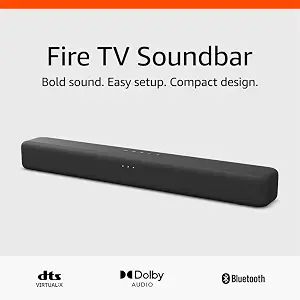
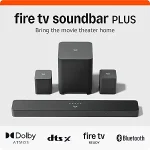
Best Budget is the editorial label for the Amazon Fire TV Soundbar among the products featured here; it is not a claim about market-wide pricing or a promise that a Black Friday price will be available. Its listed configuration is a 2.0 speaker with DTS Virtual:X and Dolby Audio. It connects to a TV through the HDMI eARC/ARC port and can connect to a phone or tablet over Bluetooth. If those are the connections you expect to use, they offer a focused set of details to check against your own setup.
The bar is 24“ long and 2.5″ high, so compare the stated size with your available placement area. Amazon says it works with smart TVs and TVs connected to streaming media players. That gives shoppers using either kind of TV setup a relevant compatibility point to verify, while the HDMI eARC/ARC connection remains the listed TV connection. Look at your TV’s port and the exact product listing before buying, especially if you are comparing it with another Fire TV-related device. Don’t infer that a streaming player is required or included from the compatibility description.
For a Black Friday comparison, weigh this soundbar’s 2.0 format, Bluetooth connection and stated TV connection against the features you actually plan to use. It may be a sensible candidate if you want to connect a phone or tablet wirelessly, or if the HDMI connection matches your TV. The provided details do not specify a subwoofer, so focus on the configuration shown in the offer rather than assuming a bundle. Compare the exact model and any included items with the Bose and TCL listings. The Fire TV Soundbar earns its Best Budget label only as a needs-based pick within this article, not as evidence that it is always the least expensive choice.
Key specs
Audio formats
2.0 speaker with DTS Virtual:X and Dolby Audio
Bluetooth
Connect your phone or tablet via Bluetooth
TV connection
the HDMI eARC/ARC port on your TV
Dimensions
a length of 24“ and a height of just 2.5″
TV compatibility
Fire TV Soundbar works with smart TVs, and TVs connected to streaming media players.
Decide what you want the added audio gear to do
Before comparing Black Friday listings, put the main reason for shopping into a sentence. Is the priority a particular TV connection, a way to play audio from a phone, a remote control for dialogue or bass, or a soundbar package that already specifies a separate subwoofer? A clear priority helps separate useful features from details that merely look impressive in a product title. It also makes it easier to judge whether a deal applies to a configuration that actually suits you.
For example, a shopper who wants both Bluetooth and HDMI ARC can examine the Bose’s listed connections and remote dialogue and bass controls. Someone whose plan centers on a wireless subwoofer can look closely at the TCL’s 2.1 configuration. A shopper who wants Bluetooth phone or tablet connectivity and an HDMI eARC/ARC TV connection can consider the Amazon Fire TV Soundbar. These are starting points, not guarantees that any model will match every preference.
Write down one must-have and one optional feature before opening listings. Then check each product’s details against that short list. If none of the listings clearly matches the must-have, pause rather than letting a Black Friday headline make the decision for you. If more than one fits, move on to placement, connections and the exact offer.
Trace the connection path from screen to soundbar
A soundbar’s listed ports matter only if they fit the devices you intend to use. Check the TV’s available outputs and identify the route you plan to take before comparing offers. The Bose lists HDMI ARC, optical in and AUX in, and describes TV setup through optical audio or HDMI. Its optical cable is included, whereas an HDMI cable is sold separately. The Amazon Fire TV Soundbar lists the TV connection as HDMI eARC/ARC. The TCL lists HDMI, optical, auxiliary, Bluetooth and USB connections.
Think through your everyday setup rather than buying on a port name alone. If the TV will be the main source, note which connection you can use and whether you need to buy a cable separately. If you want to connect another device, verify that the soundbar’s listed inputs suit that plan. Bose specifies that up to three devices can connect through its HDMI, optical and AUX inputs; Bluetooth is also listed. Don’t assume an input supports a particular use beyond what the product details state.
For Black Friday, compare the exact model and the listing’s included items with your connection plan. A headline can leave out whether a cable is part of the offer, so read the product details before checkout. If the connection route remains unclear, resolve that question first; a low advertised price cannot make an incompatible connection plan convenient.
Make room for every component, not just the bar
Placement is a practical filter, especially when a listing includes more than one piece. The Bose measures 2.21″ H x 23.38″ W x 4.02″ D, and the Amazon Fire TV Soundbar is listed as 24“ long and 2.5″ high. The TCL soundbar measures 3.86″D x 31.89″W x 2.36″H. Use these exact dimensions to check your intended shelf or TV area rather than relying on a product image to judge fit.
The TCL’s wireless subwoofer adds a separate placement decision. Wireless describes its connection to the soundbar; it does not mean the component requires no space. Think about where the subwoofer could sit and whether that arrangement suits the room. The Bose can be paired with a compatible Bass Module 500 or 700, but those are separate purchases and require a listed connection cable. That is an optional expansion to factor into a plan, not a reason to assume a module comes with the bar.
During Black Friday, look beyond the main product photo and confirm which components the exact offer contains. Measure first, then compare the listed configuration with the space available. If you cannot make room for a separate component, a bar-only setup may be simpler to plan. If you do want one, make sure the listing and your room both account for it.
Compare the Black Friday listing line by line
A Black Friday badge or headline is not enough to establish that a particular soundbar offer fits your needs. Open the exact listing and verify the product name, model and configuration. Check whether a subwoofer is included, whether a cable is described as included or sold separately, and whether the connections you need appear in the product details. For the Bose, the optical audio cable is included and HDMI is sold separately; its compatible Bose bass modules and required cable are separate considerations.
Compare like with like. A 2.0 soundbar and a 2.1 soundbar with a wireless subwoofer are different listed configurations, so their offer details should not be reduced to a single headline number. The Amazon Fire TV Soundbar’s listed details focus on its 2.0 format, Bluetooth and HDMI eARC/ARC TV connection. TCL’s include the wireless subwoofer and its listed formats and connections. Bose’s include its inputs, remote modes and optional bass-module compatibility.
Check the current offer and variant at the time you shop; no price, discount or availability is guaranteed here. If a listing’s title and configuration do not agree, use the listing’s exact product details to decide what is being offered. Compare the total setup you would actually buy, including any separately sold cable or component, rather than evaluating an isolated headline.
Use a short checklist to make the final choice
Before choosing, match each candidate to a few concrete questions: Does the TV have a connection listed for the bar? Is there room for the soundbar’s stated dimensions? Do you want the features that distinguish the model, such as Bose’s remote dialogue and bass controls, the TCL’s wireless subwoofer, or the Amazon bar’s Bluetooth connection for a phone or tablet? A yes to the most important questions is more helpful than trying to collect every available feature.
Next, consider what the offer would require beyond the main product. The Bose’s HDMI cable is sold separately, and adding a compatible bass module requires a separately sold cable. For the TCL, account for where the wireless subwoofer will go. For the Amazon Fire TV Soundbar, confirm that the TV’s HDMI eARC/ARC port suits your connection plan. These checks turn broad product descriptions into practical decisions without assuming missing details.
Finally, review the exact Black Friday listing for the model and configuration you selected. If two options still seem close, return to your must-have feature and choose the one whose listed details best support it. If a key setup fact is unclear, wait to resolve it rather than treating a promotion as a deadline to guess.
Make your Black Friday choice
The best choice here depends on the setup you want: Bose emphasizes multiple connection options and remote dialogue and bass modes; TCL is the clear pick if a wireless-subwoofer configuration is central; and the Amazon Fire TV Soundbar offers a 2.0 setup with Bluetooth and HDMI eARC/ARC TV connectivity. For Black Friday, verify the exact model, components, cables and current offer before buying. Let your TV ports, available space and main listening priority—not the sale headline—settle the decision.