Choosing a graphics card is easier when you separate the details you can verify from the results you hope to get. This guide covers three specific models: an ASUS GeForce RTX 5060 Ti with 16 GB of GDDR7, an XFX Radeon RX 9060 XT with 16 GB of GDDR6, and a GIGABYTE GeForce RTX 5060 with 8GB of GDDR7. Their memory, outputs and cooling configurations differ, so consider what you need from the card before settling on a shortlist. Black Friday can make a particular listing worth comparing, but a seasonal label alone does not establish a discount or make variants equivalent. Check the precise model and its listed specifications, then weigh those details against your setup and priorities.
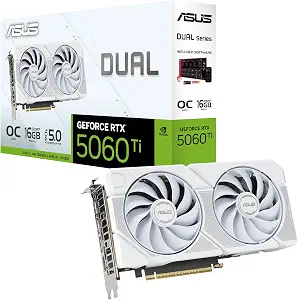
ASUS Dual GeForce RTX 5060 Ti 16GB GDDR7 White OC Edition Graphics Card
ASUS Dual GeForce RTX 5060 Ti 16GB GDDR7 White OC Edition Graphics Card (ASIN B0G1FVLWSG)
The ASUS Dual GeForce RTX 5060 Ti 16GB GDDR7 White OC Edition is the guide’s Best Overall pick as an editorial choice among these three cards—not a claim of measured superiority. Its 16 GB of GDDR7 provides a clear memory specification to compare with the other options, while the white finish may appeal if appearance is part of how you choose components. For Black Friday shopping, verify that the offer is for this exact White OC Edition rather than a similarly named card; the memory capacity, color and model name are useful checks when comparing listings.
ASUS lists a GPU clock of 2632 MHz in OC mode and 2602 MHz in Default mode. The Dual BIOS feature lets you toggle between Quiet and Performance BIOS profiles. Those are configuration options to consider if you value having a choice of profile; the specifications do not establish how much a particular mode changes noise or performance in your own system. If that distinction matters, look for product information that addresses your specific expectations rather than assuming an outcome from the profile names.
The card has a 2.5-slot design, one Native HDMI 2.1b output and three Native DisplayPort 2.1b outputs. Before buying, compare those connections with the displays and cables you intend to use, and check the card’s listed dimensions and your case’s available space. The slot description is useful for planning, but does not by itself confirm fit in a particular build. Black Friday listings can make several configurations appear close; match the product title and specifications carefully. Choose this ASUS when its 16 GB GDDR7, output configuration, white appearance and selectable BIOS profiles align with your priorities.
Key specs
Graphics memory
16 GB
GPU clock
2632 MHz (OC mode)/ 2602 MHz (Default mode)
Video outputs
1 x Native HDMI 2.1b, 3 x Native DisplayPort 2.1b
Slot design
2.5-slot design
BIOS profiles
Dual BIOS lets you toggle between Quiet and Performance BIOS profiles
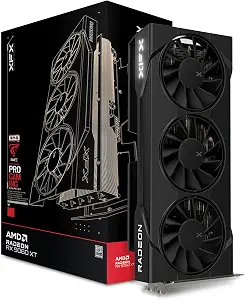
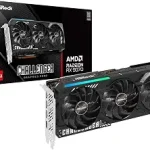
XFX Swift AMD Radeon RX 9060 XT OC Triple Fan Gaming Edition
XFX Swift AMD Radeon RX 9060 XT OC Triple Fan Gaming Edition (ASIN B0F8128Y33)
The XFX Swift AMD Radeon RX 9060 XT OC Triple Fan Gaming Edition is the Best for a triple-fan cooling design, a label based on its stated configuration rather than a measured comparison. XFX specifies an SWFT Triple Fan Cooling Solution, which makes the cooling layout a straightforward point of distinction for shoppers who prefer to compare fan arrangements. It also has 16 GB of GDDR6 memory. If you are weighing this card against other listings during Black Friday, verify the complete Swift model name and memory type; a similar-looking offer may describe a different variant.
The listed GPU is AMD RX 9060 XT, with a base clock of 1900 MHz and a boost clock up to 3320 MHz. Keep the qualifications in view: one is the stated base clock, while the other is an upper boost-clock figure. These specifications help identify the card and compare its listed configuration, but do not alone predict results for a particular game, application or computer. Consider whether the clock and memory details matter to your intended use, and avoid treating a higher-looking number as a complete comparison between different GPU models.
For connections, XFX lists HDMI 2xDP, and the interface is PCI-Express x16. Check the connector types against the displays you plan to attach and confirm the interface details against your system requirements before purchase. The triple-fan design is a reason to shortlist this XFX if that specific layout is important to you, but the available facts do not establish its noise, temperatures or fit in a particular case. During Black Friday, compare the exact model and the offer attached to it, rather than choosing from the promotion wording alone. It is a useful candidate when 16 GB of GDDR6 and a stated triple-fan design suit your selection criteria.
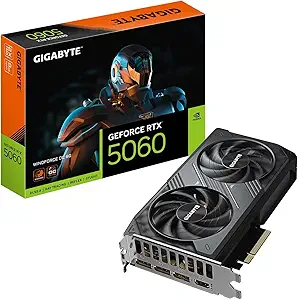
The GIGABYTE GeForce RTX 5060 WINDFORCE OC 8G is the Best Budget pick in this guide as an editorial label, not a claim that it has the lowest current price. Its listed memory is 8GB GDDR7 with a 128bit memory interface, giving shoppers a specific configuration to check when comparing it with the two 16 GB options. For Black Friday, treat the word “budget” as a way to organize your shortlist, not as evidence of a discount: compare the exact card, its specifications and the complete offer before deciding.
GIGABYTE lists a GPU clock speed of 2512 megahertz, PCIe 5.0 and a WINDFORCE cooling system. The card has two fans and lists DisplayPort and HDMI video outputs. These details may help you decide whether its stated configuration matches your priorities, but they do not establish performance, noise or cooling results in a particular system. If you are choosing among cards for a specific workload, compare information relevant to that workload as well as the specifications provided here. Avoid assuming that shared product-family names mean two listings have identical equipment.
The listed dimensions are 7.83″L x 4.57″W. Use that exact format when checking the card against the space available in your computer, and confirm any additional fit details from the exact listing or manufacturer information before checkout. The dimensions are a practical point to investigate, not a guarantee of fit in every case. This GIGABYTE is a reasonable option to examine if its 8GB GDDR7 configuration, two-fan design and listed connections fit your needs. Black Friday comparisons are most useful when you confirm the precise WINDFORCE OC 8G variant, rather than relying on a broad RTX 5060 label.
Key specs
Memory
8GB GDDR7 128bit memory interface
Interface
PCIe 5.0
Cooling
WINDFORCE cooling system
GPU clock
GPU Clock Speed 2512 megahertz
Video outputs
DisplayPort, HDMI
Fans
Number of Fans 2
Dimensions
7.83″L x 4.57″W
Start with the task, then narrow the card list
Before comparing graphics cards, write down what you expect the computer to do and which details you can verify against that use. A person choosing a card for a gaming build may focus on a different set of priorities from someone assembling a system for other graphics workloads. The supplied specifications identify memory, clocks, outputs, interfaces and cooling layouts, but do not establish results for a particular application. Use them to filter candidates, then seek relevant product information for any question these records do not answer.
The three choices here offer useful contrasts without making a universal performance ranking. The ASUS and XFX each list 16 GB of memory, but one specifies GDDR7 and the other GDDR6. The GIGABYTE lists 8GB GDDR7. Those are distinct configurations to weigh against your requirements, not a complete measure of suitability on their own. Note your priorities first—such as a particular output arrangement or cooling configuration—so the most prominent listing detail does not make the decision for you.
Black Friday can bring multiple product pages and variants into the same search. Keep a written shortlist with the full model name and the specification that matters most to you. Then check each candidate against your intended workload and system information. If an important question, such as a requirement not covered by the listed facts, remains unanswered, pause to verify it rather than filling the gap with an assumption.
Memory labels need context
Memory capacity is easy to spot on a product page, but it should be considered alongside the memory type and the needs of your intended tasks. The ASUS card lists 16 GB GDDR7, the XFX lists 16 GB GDDR6, and the GIGABYTE lists 8GB GDDR7 with a 128bit memory interface. These details let you make an accurate shortlist; they do not, by themselves, say how a card will perform in every game or application. Avoid treating capacity as the only decision criterion.
Think about the software and workloads you expect to use, and consult information that specifically addresses those demands. If you have no fixed requirement, memory can still help distinguish the configurations, but it should sit beside other questions: which outputs you need, whether the model fits your system, and which features matter to you. Keep the precise product variant in view, since memory details can differ among cards that share a broader GPU family name.
During Black Friday, make sure the memory specification belongs to the exact offer you are considering. A headline may emphasize a GPU family while the actual product title identifies a particular model. Compare the full name, capacity and memory type on the listing before weighing the offer. If a specification is not shown clearly, do not infer it from another card in this guide; verify the variant or leave it off your shortlist until the detail is clear.
Treat clock figures as specifications, not promises
Clock figures can look like an easy way to compare cards, but the labels and conditions matter. The ASUS lists 2632 MHz in OC mode and 2602 MHz in Default mode. XFX states a 1900 MHz base clock and boost clock up to 3320 MHz. GIGABYTE lists a GPU clock speed of 2512 megahertz. These are the manufacturers’ stated figures, presented with different qualifications; comparing them as though they describe the same operating condition would be misleading.
Use clock details to identify a configuration or to answer a specific question about a model, not as a stand-alone prediction of your results. The listed figures do not provide a direct comparison of performance across these different GPUs. If clock behavior is central to your decision, seek information that explains how the stated values relate to the workloads and settings you care about. Keep other specifications in the comparison as well, including memory, outputs and cooling design.
A Black Friday listing may repeat a clock number prominently, so check the accompanying mode or qualifier rather than relying on the largest figure in a headline. For the ASUS, note which BIOS profile or clock mode is being described; for the XFX, retain the “up to” wording for its boost figure. This careful reading helps prevent a listing detail from becoming an unsupported promise about everyday results.
Plan around connections and physical space
Think through your display connections before choosing a card. ASUS lists one Native HDMI 2.1b and three Native DisplayPort 2.1b outputs. XFX lists HDMI 2xDP, while GIGABYTE lists DisplayPort and HDMI. Match those descriptions to the displays and cables you plan to use, and check the exact listing for any additional detail you need. Do not assume that two cards with familiar connection names offer identical port counts or versions.
Physical fit deserves its own check. The ASUS has a 2.5-slot design, and GIGABYTE lists dimensions of 7.83″L x 4.57″W. Use those facts as starting points, then compare the exact card’s product information with the space and layout of your system. The available XFX facts do not give dimensions, so confirm those separately if fit is a deciding factor. A slot description or partial dimension alone cannot guarantee compatibility with a particular case.
Black Friday urgency is no substitute for checking these basics. Before completing an order, confirm the exact variant, the connections you need and any physical measurements relevant to your build. If a needed detail is missing from the offer page, verify it from reliable product information rather than assuming it matches a different model. A little focused checking can keep a tempting listing from distracting you from practical requirements.
Compare cooling features without guessing at outcomes
Cooling configuration is a visible product difference, but the listed design does not establish how a card will sound or behave in your computer. XFX identifies an SWFT Triple Fan Cooling Solution, and its product name also calls out a triple-fan design. GIGABYTE specifies a WINDFORCE cooling system and two fans. ASUS gives a 2.5-slot design and offers Quiet and Performance BIOS profiles through Dual BIOS. These are distinct features; none alone guarantees a particular temperature or noise level.
Decide what information you want from a cooling specification. You may simply want to compare the number of fans or identify a card with selectable BIOS profiles. If you need a specific thermal, acoustic or case-fit answer, seek information that directly addresses it. Do not turn a feature name into a claim about measured results, and do not assume that more fans automatically make one card better for every system.
Black Friday product pages can make cooling terms prominent, so compare them in context with the full model and other requirements. Confirm which card the feature belongs to, then consider it alongside memory, ports and fit. The XFX is the clear choice in this group if your selection is specifically driven by a stated triple-fan layout; that describes the configuration, not proof of superior cooling. Keep the distinction between a listed design and an observed outcome in mind as you decide.
Read the Black Friday offer as a complete listing
A seasonal promotion is only useful to your decision if the product and offer are clear. Confirm the exact manufacturer, model name and variant, then compare the specifications shown on the offer with the card you intended to buy. For these options, details such as ASUS’s White OC Edition, XFX’s Swift Gaming Edition, and GIGABYTE’s WINDFORCE OC 8G help distinguish the products. A broad GPU-family label is not a substitute for checking the full variant.
Next, compare the offer itself without assuming that Black Friday guarantees a reduced price. Check what is included in the specific listing and make sure the stated card matches your needs. If two offers appear similar, compare their specifications rather than relying on promotional language. Where an important detail is unclear, verify it before deciding. Do not treat a missing detail as proof that a product lacks a feature, or as proof that another model shares it.
A useful comparison is calm and specific: write down your preferred configuration, check the exact listing, and decide whether the offer meets your criteria. The ASUS may suit a shopper prioritizing its 16 GB GDDR7 and output arrangement; the XFX provides the listed triple-fan design; and the GIGABYTE provides its 8GB GDDR7 configuration and listed dimensions. Those distinctions help organize a decision without implying that one offer is the right choice for everyone.
Make your Black Friday choice
There is no need to choose a GPU by one prominent number or a Black Friday banner alone. Begin with your workload and system requirements, then compare the exact models and specifications that matter to you. The ASUS stands out in this guide for its 16 GB GDDR7, selectable BIOS profiles and listed outputs; the XFX for its stated triple-fan design and 16 GB GDDR6; and the GIGABYTE for its listed 8GB GDDR7 configuration and dimensions. These are useful distinctions, not guarantees of results or fit. Before buying, verify the specific variant and complete offer, and resolve any unanswered compatibility or use-case questions. That gives you a clearer basis for choosing whichever card best matches your priorities.